

Outposts is in early access. APIs and CLI commands described here may change. Contact your account team to enable Outposts for your organization.
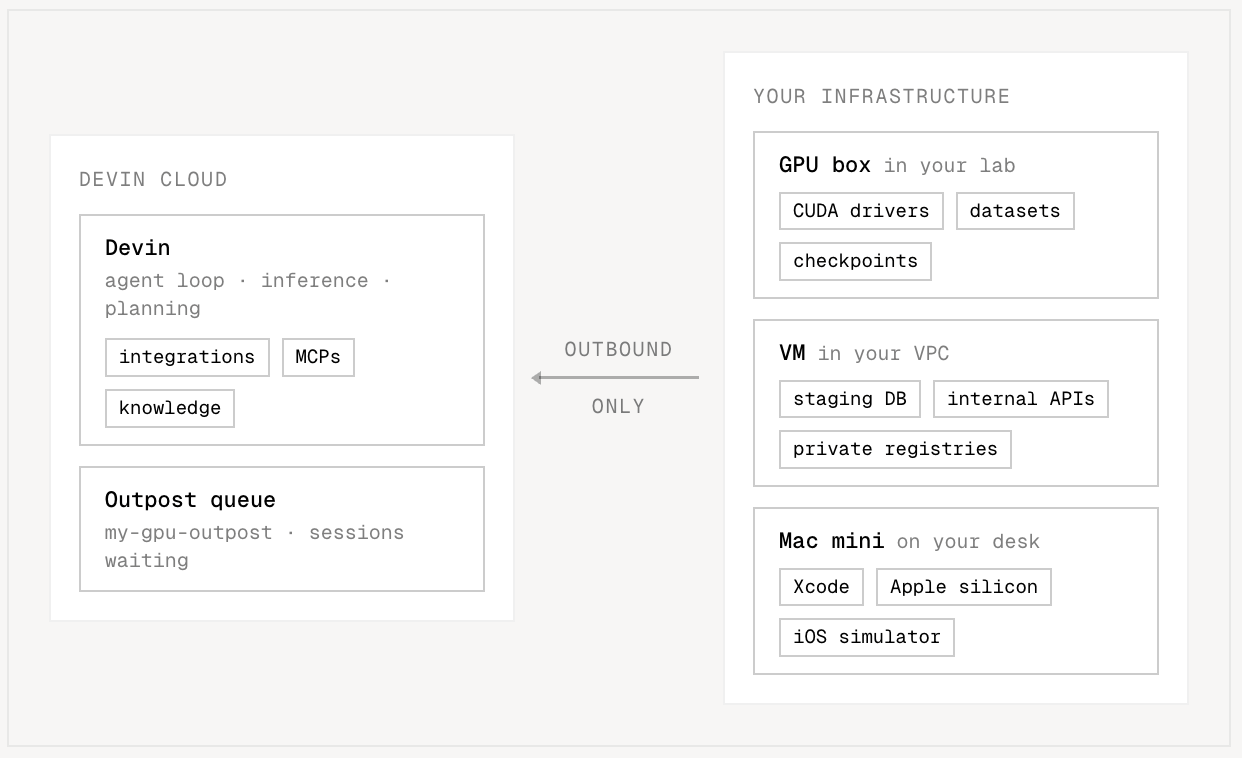
Outposts lets you run Devin sessions inside infrastructure you control — your own VMs, containers, Kubernetes clusters, or even a Mac Mini under your desk. Devin’s agent loop (inference and planning) continues to run in Devin’s cloud, while all command execution, file edits, and repository access happen on machines you operate. Use Outposts when you need:
  • Sessions to run inside your network, next to internal services, registries, and secrets
  • Custom hardware profiles (e.g. GPUs, large memory machines, specific OS images)
  • Existing dev box, VM, or Kubernetes infrastructure to host Devin workloads
  • Enterprise controls over network access, build outputs, and monitoring
How it works

Outposts has two layers:
  1. The worker (e.g. devin worker start) — a binary that you run on a machine to serve a single queued session. It opens an outbound connection to Devin’s cloud and executes the session’s tool calls locally. Cognition provides this binary; you never need to implement it. The Devin CLI contains the logic for fetching and executing this binary.
  2. The orchestrator — software that watches the fleet API for sessions waiting on workers, provisions a VM or container for each one, and starts the worker inside it. We provide some reference-implementations for common platforms (like Kubernetes), but you should feel free to adapt these (they’re open source!) or write your own.
Workers only need outbound HTTPS access. No inbound ports, public IPs, or VPN tunnels are required. When a user starts a session in Devin Cloud and selects one of your registered pools, the session is placed in that pool’s queue. Your orchestrator claims it, spawns a machine, and runs the worker. When the session ends, the worker exits and your orchestrator tears the machine down.

Prerequisites

  • An organization with Outposts enabled
  • A v3 API token with the appropriate Outposts scopes:
    • account.outposts.orchestrator for orchestrators managing pools (implies the machine scope)
    • account.outposts.machine for workers reading the queue and claiming/releasing sessions
  • A machine image (VM or container) with:
    • The Devin CLI installed
    • The machine dependencies below
    • Your repositories cloned, with configured remotes
    • Access to the build tools, package registries, secrets, and internal services your sessions need

Machine dependencies

Sessions execute directly on your machine, so the worker relies on tools you install there. Required
DependencyUsed for
git (on PATH)Cloning and all repository operations
Optional — install these to unlock specific features:
DependencyFeature
ffmpeg (on PATH)Devin’s screen-recording features. Without it, sessions cannot record the screen.
Chrome or ChromiumBrowser and computer-use features. The worker looks for Chrome in standard install locations by default; set DEVIN_CHROME_PATH in the worker’s environment to the absolute path of the binary to override (e.g. DEVIN_CHROME_PATH=/usr/bin/google-chrome). Without it, browser tools are unavailable.
Passwordless sudoLets Devin install software it needs during a session (e.g. missing build tools or system packages). Only grant this when the machine is dedicated to Devin and recycled after each session — never on shared or long-lived machines.

The core flow

1. Register a pool

A pool is a named queue of sessions served by your infrastructure (for example, rhel, gpu-h200, or my-pool). Create one with devin worker pool create:
devin worker pool create
Provide the pool name, platform, and description. Once registered, the pool appears as a machine option in Devin Cloud (alongside Ubuntu, Windows, etc.) when starting a session. Sessions targeting it wait in its queue until a worker claims them.
In the fleet API, pools are represented as pools resources, scoped to your account (shared across all of its organizations).

2. Poll the fleet API for waiting sessions

Your orchestrator lists pending sessions for the pools it serves:
curl -H "Authorization: Bearer $DEVIN_API_TOKEN" \
  "https://api.devin.ai/opbeta/outposts/devins?pool=<pool_id>&phase=pending"
The list response wraps queued sessions in items:
{
  "items": [
    {
      "metadata": {
        "session_id": "devin-...",
        "pool_id": "outpost_env-...",
        "created_at": 1781050000,
        "updated_at": 1781050000
      },
      "spec": {
        "kind": "new",
        "platform": "linux",
        "remote_binary_sha": null
      },
      "status": {
        "phase": "pending",
        "acceptor_id": null,
        "claim_deadline": null,
        "session_status": "pending"
      }
    }
  ],
  "cursor": "djE6MTc4MTA1MDAwMC4w",
  "has_next_page": false,
  "total": 1
}
Use the response cursor to paginate without repeatedly reconciling the full queue. Set first to the page size (up to 200), then pass each response’s cursor into the next request while has_next_page is true:
curl -H "Authorization: Bearer $DEVIN_API_TOKEN" \
  "https://api.devin.ai/opbeta/outposts/devins?pool=<pool_id>&first=200&cursor=<cursor>"
The API provides at-least-once delivery. A session at a page boundary can appear in both pages, so upsert entries by metadata.session_id rather than treating every item as new. When has_next_page becomes false, save the returned cursor as the starting position for the watch API.

Watch for changes

After the initial list, start a Server-Sent Events (SSE) watch with the final cursor:
curl -N -H "Authorization: Bearer $DEVIN_API_TOKEN" \
  "https://api.devin.ai/opbeta/outposts/devins?pool=<pool_id>&watch=true&cursor=<cursor>"
The stream sends MODIFIED events when a session’s queue entry changes and DELETED events when it is removed. Newly queued sessions also arrive as MODIFIED events. Each SSE data field contains JSON with this shape:
{
  "type": "MODIFIED",
  "object": {
    "metadata": {
      "session_id": "devin-...",
      "pool_id": "outpost_env-...",
      "created_at": 1781050000,
      "updated_at": 1781050100
    },
    "spec": {
      "kind": "new",
      "platform": "linux",
      "remote_binary_sha": null
    },
    "status": {
      "phase": "pending",
      "acceptor_id": null,
      "claim_deadline": null,
      "session_status": "pending"
    }
  },
  "cursor": "djE6MTc4MTA1MDEwMC4w"
}
Persist each event’s top-level cursor after processing it. If the connection closes, reconnect with the last persisted cursor to replay any changes that occurred while disconnected. Watch delivery is also at least once, so clients must tolerate duplicate events. Streams end after at most five minutes; a reconnecting watch loop is expected. The pool filter applies to both list and watch requests. The phase and acceptor_id filters apply only to list requests and are ignored when watch=true; filter watched events using the fields in each event’s object. Omitting the cursor starts from the beginning, so use list-then-watch for normal reconciliation. Before starting a machine for a session, atomically claim it so no other worker picks it up. Pass an acceptor_id — a self-reported identity for your worker:
curl -X POST -H "Authorization: Bearer $DEVIN_API_TOKEN" \
  -H "Content-Type: application/json" \
  -d '{"acceptor_id": "worker-1"}' \
  "https://api.devin.ai/opbeta/outposts/devins/{session_id}/claim"
Claims are atomic: if another worker claimed the session first, you get a 409. Claiming promises that a worker will be ready within the server-assigned claim deadline (status.claim_deadline); expired claims return to the queue automatically. If provisioning fails, release the claim so the session returns to the queue immediately:
curl -X POST -H "Authorization: Bearer $DEVIN_API_TOKEN" \
  -H "Content-Type: application/json" \
  -d '{"acceptor_id": "worker-1"}' \
  "https://api.devin.ai/opbeta/outposts/devins/{session_id}/release"

3. Spawn a machine and run the worker

For each claimed session, provision a VM or container from your image. Inside it, run the worker from the directory where the session’s repositories are already checked out:
cd /path/to/repos
devin worker start --session=<session_id> --pool=<pool_id> --acceptor-id=<worker_id>
All of the session’s repositories must be checked out relative to the working directory where devin worker start is invoked:
repos
app
.git
infra
.git
In this example, you would run devin worker start from repos/, and the session sees app/ and infra/ relative to its working directory. Useful flags:
FlagDescription
--sessionIdentifies the session to serve; the worker exits when it ends.
--poolIdentifies the pool for the session to serve.
--acceptor-idUses the same acceptor ID as the API claim for this worker.
--tokenOptional auth token for the worker. If omitted, the worker uses DEVIN_OUTPOSTS_TOKEN; if neither is set, the command errors.
Examples:
devin worker start --session=<session_id> --pool=<pool_id> --acceptor-id=<worker_id> --token="<token>"
DEVIN_OUTPOSTS_TOKEN="<token>" devin worker start --session=<session_id> --pool=<pool_id> --acceptor-id=<worker_id>
The worker connects out to Devin’s cloud, marks the session ready, and begins executing tool calls.

4. Fetching the remote binary directly

The devin worker start command automatically downloads the correct devin-remote binary. If you are building a custom orchestrator that does not use the Devin CLI, you can fetch the binary directly from:
https://static.devin.ai/devin-rs/remote/
Determine the latest version:
# Returns the git SHA of the latest published binary for your platform
curl -fsSL "https://static.devin.ai/devin-rs/remote/latest_linux_x64"
Download and verify:
SHA=$(curl -fsSL "https://static.devin.ai/devin-rs/remote/latest_linux_x64")

# Download the binary
curl -fL "https://static.devin.ai/devin-rs/remote/devin-remote_${SHA}_linux_x64" \
  -o devin-remote

# Download and verify the checksum
curl -fsSL "https://static.devin.ai/devin-rs/remote/devin-remote_${SHA}_linux_x64.sha256" \
  -o devin-remote.sha256
echo "$(cat devin-remote.sha256)  devin-remote" | sha256sum -c

chmod +x devin-remote
Available platforms:
SuffixOS / Architecture
linux_x64Linux x86_64
macos_arm64macOS Apple Silicon
windows_x64.exeWindows x86_64
If the session’s queue entry includes a spec.remote_binary_sha, use that SHA instead of latest — it pins the session to a specific tested version.

Spawn contract

If your orchestrator launches devin-remote itself, spawn it as:
devin-remote serve
with the following environment variables:
VariableRequiredDescription
DEVIN_OUTPOST_GATEWAY_URLYesOutpost gateway base URL, e.g. wss://outpost-gateway.devin.ai.
DEVIN_OUTPOST_CONNECT_TOKENYesBearer connect token for the gateway, from the claim response.
DEVIN_OUTPOST_SESSION_IDYesThe session ID being served. All three DEVIN_OUTPOST_* variables must be set together.
DEVIN_REMOTE_STATE_DIRStrongly recommendedPer-session state directory where the remote stores its credentials, tokens, and shell-integration files. Use a unique directory per session (e.g. ~/.devin/worker/sessions/<session_id>, which is what devin worker uses). If unset, the remote falls back to a shared system-wide default (/opt/.devin on Linux, ~/.devin on macOS, C:\ProgramData\devin on Windows), which must then exist and be writable — and which leaks per-session state across concurrent sessions. Always set this.
DEVIN_CHROME_PATHOptionalPath to a Chrome/Chromium binary on the box for the browser tool (there is no Devin-managed Chrome on Outposts).
DEVIN_OUTPOST_DESKTOPOptionalSet to true to enable the desktop (VNC) stream. It is lazy on the remote side — nothing is captured until a viewer connects — so it is safe to enable unconditionally.
Give the remote a clean environment containing only the variables above plus basic system variables (PATH, HOME, USER, LOGNAME, TMPDIR, LANG, TZ, and — for the desktop stream’s screen capture on Linux/X11 — DISPLAY, WAYLAND_DISPLAY, XAUTHORITY). Do not leak anything the agent should not be able to see into the remote: it is inherited by the agent’s shell. Additional lifecycle expectations:
  • Working directory: launch the remote from the directory containing the session’s repositories (the same rule as devin worker start).
  • Session end: when the session ends (sleeps or terminates), Devin notifies the remote and it exits with status 0 on its own. Treat a clean exit as the end of the session: confirm the queue entry’s status.session_status is suspended or terminated (the status update can lag the exit by a few seconds, so re-read a few times), then release the claim. As a fallback, also poll status.session_status while the remote runs and kill the process yourself once it reaches terminated (or the queue entry disappears).

5. Terminate the machine when the worker exits

When devin worker start exits, the session is over (or has been suspended). Terminate the VM or container. If your pool is resumable, snapshot the machine before terminating so you can restore it if the session resumes. Your orchestrator can track its claimed sessions and their states:
curl -H "Authorization: Bearer $DEVIN_API_TOKEN" \
  "https://api.devin.ai/opbeta/outposts/devins?phase=claimed&acceptor_id=worker-1"
Each entry reports a status.session_status of pending, running, suspended, or terminated.

Centralization-free scheduling

Planning to run more than ~16 coordinators (workers or orchestrators watching and claiming from a pool)? Contact your account team first — larger fleets amplify claim contention and queue read load, and we want to make sure the pool is provisioned for it.
You don’t need a central scheduler to run a fleet. The queue API is designed so that many independent workers can serve the same pool without talking to each other:
  • Claims are the only coordination primitive. Every worker independently watches the queue and races to claim pending sessions. The claim is an atomic compare-and-swap on the server: exactly one worker wins, and every loser gets a 409 and simply moves on to the next pending session. Losing a claim race is normal operation, not an error.
  • Each worker has its own identity. The acceptor_id scopes a worker’s claims, renewals, and restart recovery to that worker alone. devin worker start generates and persists one automatically per machine, so a fleet needs no identity configuration. Never share an acceptor ID (or a copied worker data directory) across machines — colliding workers will steal each other’s claims.
  • Failures self-heal. If a worker dies after claiming, its claim expires at the claim deadline and the session returns to the queue for another worker to pick up. No fleet-level health tracking is required.
This means scaling out is just running the worker on more machines pointed at the same pool: N machines serve N concurrent sessions, and the rest wait as pending. Two operational notes:
  • Use the watch endpoint, not repeated full lists. Do one paginated list to build initial state, then hold a watch stream from the returned cursor. Re-polling the entire queue from every worker scales poorly and adds claim latency; the watch stream delivers changes as they happen.
  • Talk to us before going past ~16 machines on a pool. Coordination-free claiming works well at small fleet sizes, but larger fleets amplify claim contention and queue read load. If you plan to run more than about 16 workers against a single pool, contact your account team first so we can make sure the pool is provisioned for it.

API reference

All Outposts endpoints live under https://api.devin.ai/opbeta and share a common resource shape (metadata / spec / status). List responses return items, cursor, has_next_page, and total.

Devins (/outposts/devins)

EndpointDescription
GET /outposts/devins?pool=...&phase=pendingList sessions waiting for a worker.
GET /outposts/devins?pool=...&first=...&cursor=...Continue a paginated list from a previous response cursor.
GET /outposts/devins?pool=...&watch=true&cursor=...Stream MODIFIED and DELETED events after a list or watch cursor.
GET /outposts/devins?phase=claimed&acceptor_id=...List sessions claimed by a given acceptor.
GET /outposts/devins/{session_id}Get a single queue entry.
POST /outposts/devins/{session_id}/claimAtomically claim a session (409 if already claimed). Body: {"acceptor_id": "..."}.
POST /outposts/devins/{session_id}/releaseRelease a claim, returning the session to the queue. Body: {"acceptor_id": "..."}.

Pools (/outposts/pools)

EndpointDescription
GET /outposts/poolsList your account’s pools.
POST /outposts/poolsCreate a pool. Body: {"name": "my-pool", "platform": "linux", "description": "..."}.
GET /outposts/pools/{pool_id}Get a single pool.
DELETE /outposts/pools/{pool_id}Delete a pool (409 while it has active claims).
{
  "metadata": {
    "pool_id": "outpost_env-...",
    "account_id": "...",
    "created_at": 1781050000
  },
  "spec": {
    "name": "my-pool",
    "platform": "linux",
    "description": "..."
  },
  "status": {
    "queue_depth": 3,
    "active_claims": 2
  }
}
status.queue_depth and status.active_claims are useful autoscaling signals: if the queue is backing up, your orchestrator can provision more warm machines.

What workers can do

Sessions running on Outposts workers are full-featured Devin sessions: skills, knowledge, MCP servers, and secrets all work the same way as in Devin Cloud, delivered through the worker’s connection. Your repositories, build caches, and tool execution stay in your environment; session artifacts like screenshots are uploaded to Devin Cloud so you can view them in the session and in PRs.
Outpost sessions have strict readiness timeouts. After your orchestrator claims a session, the worker must connect before the claim deadline — otherwise the claim expires and you are still billed for the fixed and hourly costs incurred during the timeout window.