Documentation Index
Fetch the complete documentation index at: https://docs.devin.ai/llms.txt
Use this file to discover all available pages before exploring further.
Devin 的 API 功能强大,在继续阅读本指南之前,请先阅读以下文章。
-
创建 Pull Request:向仓库提交一个包含更改的 Pull Request(PR),这些更改可能包含由代码扫描工具识别出的问题。
-
触发 GitHub Action:PR 被创建后,会自动触发一个 GitHub Action 工作流。
-
GitHub Action 调用 Devin API:GitHub Action 向 Devin API 发送请求,并将识别出的问题传递给 Devin 以进行自动修复。
-
初始化 Devin 会话:一个 Devin 会话被创建并启动,接收问题的上下文信息,并基于提供的数据尝试解决该问题。
-
Devin 提交供人工审核的 PR:问题解决后,Devin 生成一个包含建议更改的 PR,并提交给人工进行审核。
- 配置 GitLab 环境以保存所需的密钥(secrets):
- 配置 GitLab 环境,以安全存储与 Devin 的 API 和其他集成工具交互所需的密钥(例如身份验证令牌和配置密钥)。
完成这些步骤后,你的流水线就可以通过 Devin 的 API 自动解决问题,从而加快处理速度并减少人工干预。
- 测试集成
完成设置后,你可以通过手动触发一次 GitLab Action 来测试集成。这样可以验证该 Action 是否正确调用 Devin API 并解决已识别的问题。
- 查看 Devin Sessions 页面
在触发 GitLab 构建并由 Devin 处理完问题之后,你可以在 Devin Sessions 页面查看状态和结果。此页面会提供有关已解决问题和建议变更的详细信息。
如前所述,从 SonarQube 所需的值为:
要配置此集成,你需要从你的
SonarQube 实例中获取以下三个值:
你将需要从 SonarQube 获取三个值:{SONAR_TOKEN, SONAR_ORG, SONAR_PROJECT_KEY}
一旦你获得了所有必需的值,就可以开始配置 GitLab Action。
这里假设你有一个本地的 SonarCloud 属性文件 sonar-project.properties,其中包含如下配置:sonar.projectKey={PROJECT_KEY}
sonar.sources=FILE_PATH (usually ".")
GitLab Action 的源代码如下所示
stages:
- analyze
- remediate
variables:
SONAR_TOKEN: "$SONAR_TOKEN"
SONAR_ORG: "$SONAR_ORG"
SONAR_PROJECT_KEY: "Colhodm_juice-shop"
DEVIN_API_KEY: "$DEVIN_API_KEY"
GIT_STRATEGY: clone
analyze:
stage: analyze
image: sonarsource/sonar-scanner-cli:latest
script:
- sonar-scanner -Dsonar.organization=$SONAR_ORG
only:
- branches
- merge_requests
setup_python:
stage: remediate
image: python:3.9
before_script:
- python --version
- pip install aiohttp
script:
- git config --global user.name "GitLab Runner"
- git config --global user.email "runner@gitlab.com"
- python3 $CI_PROJECT_DIR/.gitlab/scripts/devin_remediation.py
only:
- branches
- merge_requests
提醒一下,devin_remediation.py 文件如下:
python
import asyncio
import aiohttp
import os
from datetime import datetime
# 环境变量
GITHUB_REPOSITORY = os.getenv("GITHUB_REPOSITORY")
SONAR_TOKEN = os.getenv("SONAR_TOKEN")
DEVIN_API_KEY = os.getenv("DEVIN_API_KEY")
SONAR_ORG = os.getenv("SONAR_ORG")
SONAR_PROJECT_KEY = os.getenv("SONAR_PROJECT_KEY")
DEVIN_API_BASE = "https://api.devin.ai/v1"
async def get_sonarcloud_issues():
"""从 SonarCloud 获取未解决的漏洞。"""
url = "https://sonarcloud.io/api/issues/search"
headers = {"Authorization": f"Bearer {SONAR_TOKEN}"}
params = {
"organization": SONAR_ORG,
"projectKeys": SONAR_PROJECT_KEY,
"types": "VULNERABILITY",
"statuses": "OPEN"
}
async with aiohttp.ClientSession() as session:
async with session.get(url, headers=headers, params=params) as response:
if response.status != 200:
print(f"获取 SonarCloud 问题时出错: {await response.text()}")
return []
result = await response.json()
print(f"发现 {len(result.get('issues', []))} 个问题")
return result.get('issues', [])
async def delegate_task_to_devin(issue):
"""将修复、提交和推送的完整任务委托给 Devin AI。"""
async with aiohttp.ClientSession() as session:
headers = {"Authorization": f"Bearer {DEVIN_API_KEY}"}
prompt = f"""
修复 {GITHUB_REPOSITORY} 中的以下漏洞: {issue['message']},位于文件 {issue['component']}。
1. 创建一个名为 'devin/{issue['key']}-fix-vulnerability' 的新分支。
2. 实施修复。
3. 编写详细的提交消息说明更改:
- Issue Key: {issue['key']}
- Component: {issue['component']}
- Fixed by Devin AI at {datetime.now().isoformat()}
- Include 'Co-authored-by: github-actions[bot] <github-actions[bot]@users.noreply.github.com>'.
4. 将分支推送到远程仓库。
5. 创建一个包含修复说明的拉取请求。
"""
data = {"prompt": prompt, "idempotent": True}
async with session.post(f"{DEVIN_API_BASE}/sessions", json=data, headers=headers) as response:
if response.status != 200:
print(f"委托任务给 Devin 时出错: {await response.text()}")
return None
result = await response.json()
print(f"Devin 会话已创建: {result}")
return result
async def monitor_devin_session(session_id):
"""监控 Devin 的进度直到任务完成。"""
async with aiohttp.ClientSession() as session:
headers = {"Authorization": f"Bearer {DEVIN_API_KEY}"}
while True:
async with session.get(f"{DEVIN_API_BASE}/sessions/{session_id}", headers=headers) as response:
if response.status != 200:
print(f"监控 Devin 会话时出错: {await response.text()}")
return None
result = await response.json()
status = result.get("status_enum")
if status in ["completed", "stopped"]:
print(f"Devin 已完成任务: {result}")
return result
elif status == "blocked":
print("Devin 遇到问题,请手动检查。")
return None
await asyncio.sleep(5)
async def main():
try:
issues = await get_sonarcloud_issues()
for issue in issues:
print(f"正在处理问题: {issue['key']}")
# 将任务委托给 Devin AI
session_data = await delegate_task_to_devin(issue)
if session_data:
session_id = session_data["session_id"]
# 监控 Devin 的进度
await monitor_devin_session(session_id)
except Exception as e:
print(f"发生错误: {str(e)}")
raise
if __name__ == "__main__":
asyncio.run(main())
为确保 GitLab Action 能正确设置环境变量,请将这些变量添加到 GitLab CI/CD Secrets 中。
找到对应的设置位置可能有点麻烦。进入 Settings,编辑 Secrets,然后在 Repository Secrets 下添加 SONAR_TOKEN 和 DEVINS_API。
如果你使用自托管的 GitLab,那么唯一的区别是:
配置完成后,你可以查看 GitLab Action 的执行情况。如果运行成功,它将显示如下:
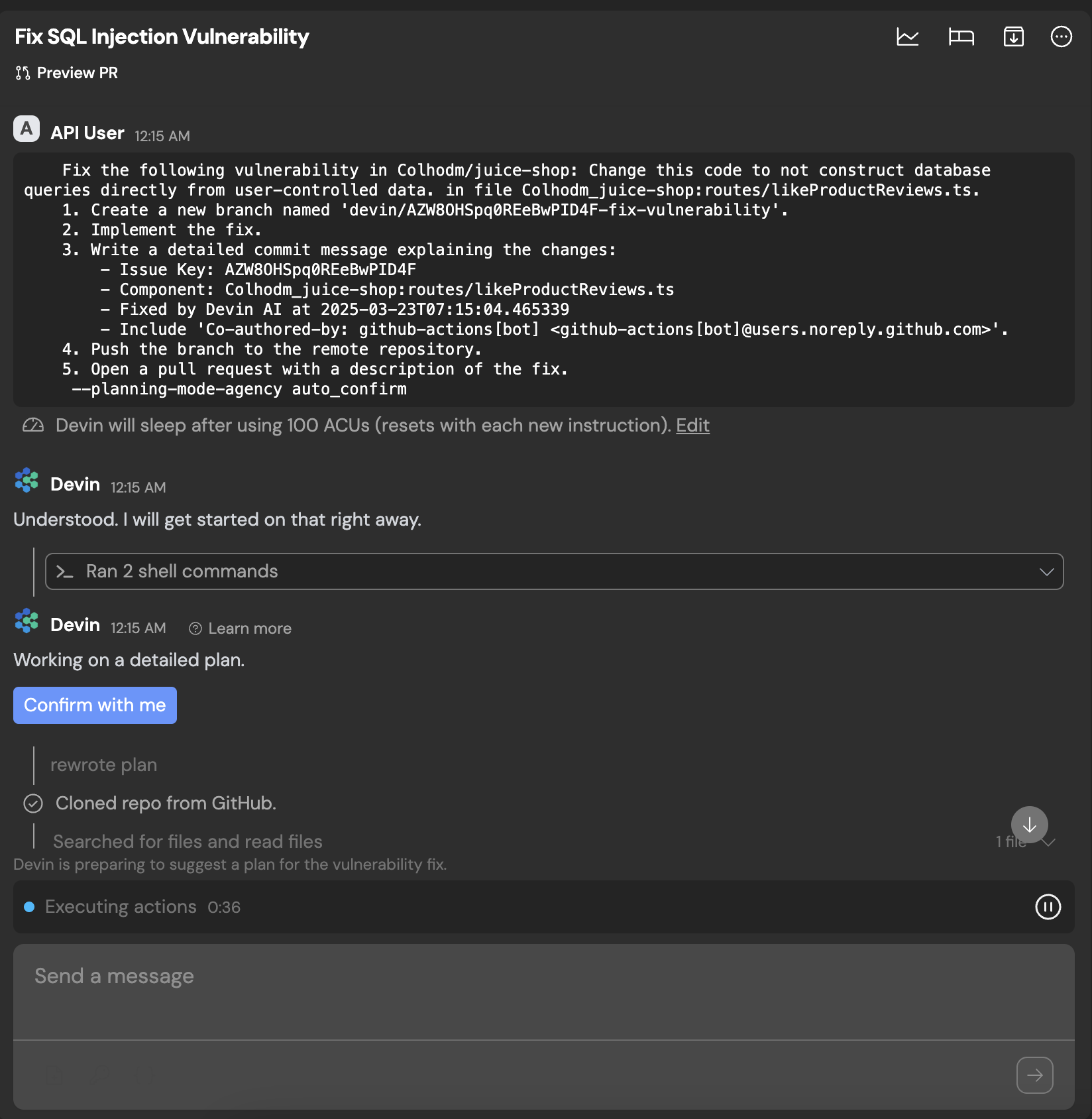
您可以在 Session Manager 中查看 Devin 的会话。
处理完成后,Devin 会自动打开拉取请求(pull request,PR)。对于 GitLab 用户,请参阅此指南。