

Modes
Code, Smart, Ask, Plan, and Bypass Permissions, and how to plan before implementing.
Customizations
Plugins, skills, MCP servers, hooks, and rules, and the surface that shows what a session has loaded.
Permissions
Allow, ask, and deny rules, approval requests, and MCP tool permissions.
Worktrees
Run a session in a git worktree and merge its changes back into your workspace.
Key features
Token efficiency
The Devin Local agent is built around prompt caching, so most tasks use fewer tokens for the same result.Subagents
The Devin Local agent can spawn independent subagents to handle subtasks — either in the foreground or background. Subagents share tools and codebase context with the parent agent but operate in their own conversation chain. Subagents are controlled by the Subagents (Preview) toggle inDevin Settings.
Beyond the built-in profiles, you can define your own subagents as markdown files under agents/ using either layout:
- Flat file —
agents/<name>.md, where the file name becomes the profile’s identifier. - Directory —
agents/<name>/AGENT.md, where the directory name becomes the profile’s identifier.
Sandboxing
The Devin Local agent supports OS-level sandboxing. When enabled, the sandbox enforces:- Filesystem isolation — writable paths are derived from your permission scopes, and
Read(...)deny rules hide paths from sandboxed commands - Network filtering — domain allowlists and denylists control what the agent can reach
Quick Review
Quick Review is a dedicated subagent available with the Devin Local agent to get rapid feedback on changes.Switching your agent
New tabs start with Devin Local when you haven’t chosen a preferred agent. If Devin Local isn’t available to you, the tab uses the first selectable ACP agent instead, and if no agent is available it shows the default new-tab UI and waits until one is. You can change the agent for new conversations at any time via the agent selector in the bottom right corner of Devin Desktop — Devin Local is selectable even while it is still connecting.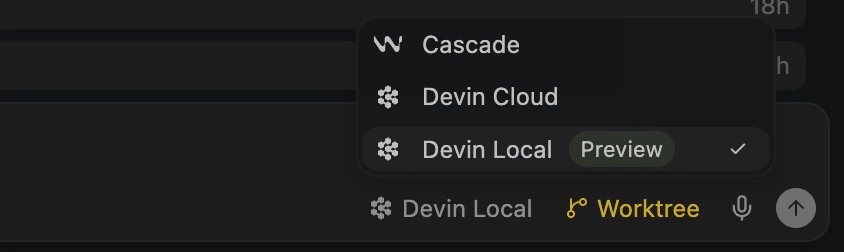
Agent settings
If Devin Local doesn’t appear in the agent selector, you might need to enable it fromDevin Settings:
- Open the Command Palette with
Cmd+Shift+P(macOS) orCtrl+Shift+P(Windows/Linux) - Open
Devin User Settings - Click the “Agents” tab
- Toggle the “Devin Local” agent on
- Restart Devin Desktop

Enterprise admins
Devin Local is a bundled agent that Devin Desktop fetches from the server. Whether it appears in the agent selector is controlled by the Devin Local Agent team setting:- On Team and other non-enterprise plans it is available by default (unless an individual member has this access disabled).
- On Enterprise plans it is gated, so an admin must turn it on for members.
- Devin Enterprise admins — Settings → Enterprise → Devin Desktop (
app.devin.ai/org/{orgName}/settings/desktop). Under Features, enable Devin Local Agent (“Allow members to use the Devin Local agent in Devin Desktop and delegate tasks to Devin’s terminal agent via ACP”). - Windsurf Enterprise admins — the Windsurf dashboard.
Restricted Mode
When a workspace is open in Restricted Mode, agents are unavailable in it: Cascade, Devin Local, and every ACP agent are disabled, and hooks neither load nor run. Agents become available again once the workspace is no longer in Restricted Mode.Conversation sharing
In Devin Desktop, choose Share conversation from the actions menu below a completed turn; in Devin CLI or another ACP client, run/share. The agent uploads a sanitized transcript (secrets redacted, system prompts and tool definitions dropped) and returns a link to share with your team. Sharing is only offered when your organization allows conversation sharing, you are signed in with a Devin account (not a Windsurf-only account), and the client supports sharing.
Analytics
Devin Local activity is reported in thecascade_runs data source (model usage, messages sent, and credit consumption), the cascade_tool_usage data source (per-tool call counts such as Code Edit, Run Command, Search Web, and MCP Tool), the cascade_lines data source (daily lines of code written by the agent), and the Cascade Data source of the Custom Analytics API.
Devin Local does not track suggested lines or “modes”: an edit only runs after you approve it, so accepted lines equal suggested lines, and the mode field in cascade_runs is not populated.
The Devin CLI does not report analytics for hybrid deployments.
Enterprise controls
Enterprise admins can configure the Devin Local agent through team settings, including new controls only available with the Devin Local agent:- Sandbox enforcement - Require sandbox mode for all users and configure organization-wide domain filtering rules
- Granular permissions - Control which actions the agent can take with more fine-grained permissions
- Network enforcement - Control network access with allowed and denied domains
/share.
Additionally, the “Enable Cascade” control can be used to disable the legacy Cascade agent entirely to ensure your team follows the new controls available with Devin CLI.
Unsupported enterprise controls
The following legacy enterprise controls are not available with the Devin Local agent:- Restrict Tool Calls to Workspace - by default, the Devin Local agent can only read/edit files within the workspace. Custom permissions are a more flexible replacement that can be used to replicate the same rules.
- Global tool calling disabled - If you previously disabled tool calling entirely, write an equivalent permission policy for Devin CLI instead.
- Auto Run Terminal Commands - The Devin Local agent uses its own permissions model instead of auto-execution levels; we recommend using this instead, but the old control will still be enforced as a fallback.
- Terminal allow lists - Implement an equivalent permission policy for Devin CLI to allow specific terminal commands.
- Terminal deny lists - Implement an equivalent permission policy for Devin CLI to deny specific terminal commands.