

- Sessions:
- Drag a session from the sidebar onto an open session to view up to 8 sessions side by side.
- Group sidebar sessions by workspace, with a ”+” on each group to start a session in that folder.
- Start a child session from any session’s “More” menu.
- Sessions grouped into Spaces now appear under a parent session in the sidebar.
- Files, changes, and terminals in every session:
- A Files view shows a local session’s working directory or a cloud session’s machine as a file tree next to the editor.
- The Changes tab now works for local sessions, with per-file diffs and a “Since last seen” scope.
- Terminal in a session’s add-tab menu opens a terminal on the session’s machine, or a local shell in the session’s folder.
Cmd/Ctrl+Oopens a local file in the Agent Window, andCmd/Ctrl+Shift+Fsearches the text of the session’s files.- Files open in the Agent Window’s editor support code actions and rename.
- Select code in an editor tab and press
Cmd/Ctrl+Lto quote it into the chat.
- Cloud sessions:
- The IDE button in the top right opens a Remote SSH window on the session’s machine.
- App previews open in a Preview tab, with a URL bar, port switching, device sizes, and an element picker.
- Cloud sessions connected to your machine read unsaved edits from open editors.
- Code scan sessions show a scan badge and open their Findings view beside the chat.
- Customizations and settings now match the same UI as Devin Cloud.
- New shortcuts:
Cmd/Ctrl+.cycles the agent mode,Cmd/Ctrl+[andCmd/Ctrl+]go back and forward,Cmd/Ctrl+Shift+Lcopies a link to the session, andCmd/Ctrl+Shift+Emarks a session done. Typing anywhere focuses the composer. - Settings → Preferences → Appearance lets you pick the interface and code fonts and their sizes.
- Pressing Enter while Devin is working steers the running turn;
Cmd/Ctrl+Enterqueues the message until the turn ends. - Configured MCP servers can be @-mentioned.
- The command palette searches the content of Local sessions, not only their titles.
- On Windows, WSL distros can be used as remote agent hosts alongside SSH hosts, and remote hosts are listed in the Cloud / Local picker.
- Devin no longer opens files in the background when it edits them. Turn “Auto-open edited files” back on in Devin Settings → Editor → User Interface to restore this.
- Agent diff zones are off by default, so agent edits are applied directly to files. Re-enable them in Devin Settings → Editor → User Interface → Agent diff zones.
- Agent edits are saved without running format-on-save or code actions. Enable “Run save actions on agent edits” to restore the previous behavior.
- Worktrees are no longer deleted automatically once a repository has more than 19 of them.
- Plugins can declare
platforms: [cloud]orplatforms: [local]; Devin Desktop only activates plugins that apply locally.
- Long sessions stay responsive while replies stream, and scrolling long transcripts is smoother.
- MCP servers from every configured registry can be installed, not only those from the first registry.
- MCP tool calls that need approval in Devin Local show their Allow / Reject controls.
- Saving agent environment variables restarts the affected local agent, so new sessions use the updated values.
- The “System notifications” switch in Devin settings now turns agent notifications on and off.
Ctrl+Shift+Ccopies in terminals again, and the Send Terminal to Chat shortcut works on Windows and Linux.- Markdown files of a cloud session open as a rendered preview again.
Download 3.11.1108
Download 3.11.1108
- Devin Desktop no longer crashes at startup on Apple Macs using M6 chips
- Fixed a memory leak with the agent command center
- Choosing a folder for an agent on an SSH or WSL host now works when the side panel and a new-session welcome are both open.
- MCP servers passed by an ACP client in
session/new/session/loadare now usable by the agent and listed in/mcp, including for HTTP and SSE MCP servers
Download 3.10.1035
Download 3.10.1035
- Restricted Mode blocks restricted workspace settings written in nested object form, not just the dotted form (CVE-2026-81376).
- Switching back to one of your 10 most recently viewed sessions shows its transcript immediately.
Download 3.10.1031
Download 3.10.1031
- Dragging files from the Explorer onto the agent panel, or sending an editor selection to chat, adds them to the composer again.
- Remote SSH sessions open right after a reload or relaunch, without a “session is locked by another process” error.
- Devin Fusion can be activated even when Claude Fable 5.1 isn’t available as a lead model.
Download 3.10.1027
Download 3.10.1027
 Devin Desktop
- Remote agent hosts: connect to agents over SSH from the location selector, with saved hosts, status dots, and a server icon in the sidebar. SSH sessions recover the exact transcript after a reconnect.
- Local sessions can now be deleted from the agent sidebar.
- Faster startup, bounded memory for background transcripts and streamed file writes, and cheaper loading spinners.
- When switching between sessions in the Agent Command Center, the file explorer now updates to match the working directory of the active session.
- ACP is always enabled — the Enable ACP toggle is gone.
- MCP authorization opens the provider directly, and Docker-based MCP servers from the registry launch correctly.
- Agent activation failures report the agent’s last stderr line and open that agent’s output channel.
- Some legacy Cascade entry points are removed: new-agent option, annotations, conversation mentions, settings group, automatic Lifeguard checks, Vibe & Replace, Deploy, and workflow commands.
- Files Devin edits in Desktop count toward lines-of-code analytics.
- Network access requests now match the web app: an “Allowlist N domains” card that names the policy blocking the destinations and lets permitted users update the governing security profile or automation.
- Archiving a cloud session with open pull requests offers to close them, and archives its child sessions.
- Improved cloud session formatting with an image preview carousel, hook run visibility, and rich queued messages.
- A message sent during a Devin Cloud outage is held and delivered when the connection returns.
Download 3.10.1023
Download 3.10.1023
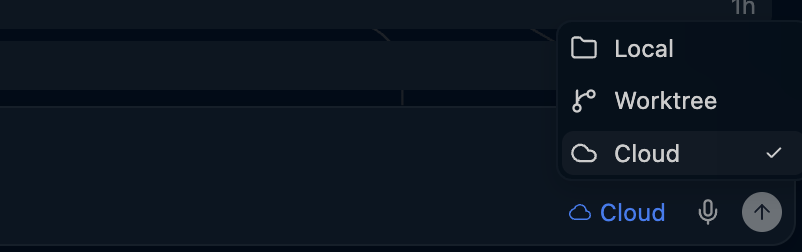
- The agent location picker now shows Local, Worktree, and Cloud as top-level options, with existing worktrees in a searchable nested submenu.
- Agent sidebar: sessions updated in the last 30 days are shown by default.
- The agent inbox list view now has per-row checkboxes for batch archive/unarchive, and the title-bar back/forward arrows navigate between the inbox and opened sessions.
- Trigger menus (
/,@,!) no longer open when followed by whitespace, and stay closed after you click into the conversation. - Cmd/Ctrl+F opens find-in-page in Devin Review and embedded Devin web surfaces. Devin Review tabs show the PR title, open GitHub links at their diff anchor, and the sessions sidebar swaps to a PR files/review sidebar (or the wiki page tree) while a fullscreen review or wiki is open.
- PR cards gained Open Devin Review, Open in Desktop tab, Close PR, and Git settings actions, and Checkout branch now finds local clones (including worktrees) and lets you pick one when several match.
- Fixed attaching to dev containers whose remote user is a
uid:gid, Remote-WSL activation on a fresh install, and MCP registry fetches behind corporate proxies. - Clipboard images can be pasted into the New Session page.
- Problems panel actions now send problems to Devin Local when Cascade is disabled.
- Config changes reach sessions in the order they are selected, so a rapid sequence no longer lets an older update overwrite a newer one.
Download 3.9.1018
Download 3.9.1018
- The Agent Command Center now follows whichever space is selected instead of being tied to one folder, converts an editor window in place (no reload, no save prompt), and any number of agent windows can run side by side.
- A new Agent Command Center location setting (
devin.agentWindow.location) can be used to split the agent command center into a separate window from the editor. - Significantly improved performance for switching between Agent and Editor mode (Ctrl/Cmd+G).
- Improved update process on Windows to only install after explicitly clicking Restart to Update.
- Windows: Install Devin CLI now writes a shim to the bundled CLI, so updating Devin Desktop updates the
devincommand too. - Linux: uninstalling or upgrading the
.debno longer removes the shared Microsoft apt keyring, so other repositories signed by it keep working. - The agent sidebar, composer, and welcome page now warn when a workspace is untrusted and offer a trust workspace prompt to activate local agents.
- Fixed a rare bug where the window could scroll up after a mode switch.
- Improved recovery for corrupted
file://working directories. - Added the ability to rename sessions from the tab dropdown.
- Enterprise: Added a link to request more usage when hitting ACU limits.
- Added support for working on multi-root workspaces containing virtual filesystem folders.
- Improved plan mode with a full Markdown plan file that can be separately reviewed, with an explicit Implement button.
- Running subagents can be stopped individually without cancelling the turn.
- Explain and Fix Problem sends problems to Devin Local when Cascade is disabled.
- Devin Local tabs show the same status indicators as Cascade legacy tabs and the Current Workspace view keeps other projects’ conversations out of the list.
post_setup_worktreehooks now run for worktrees created from a Devin Local session, so.envfiles and other untracked setup are copied in before the session starts.- New settings control whether integrated terminal activity and local user-edit activity are shared with ACP agents (both remain on by default).
mcp_config.jsonno longer shows spurious “Property is not allowed” warnings.- Up/down arrows in the chat input once again navigate through previous prompts.
- Fixed the migration wizard to work in remote SSH workspaces.
- The sessions sidebar now has improved filtering and sorting controls.
- Live shell output streams into the session while a command runs, and finished shell rows expand to their full command and complete output.
- Terminal cards follow the newest output instead of the oldest, transcript timestamps appear on hover, and a failed send restores your draft to the input instead of losing it.
- Session tabs and the command palette offer Copy Session URL.
- Saving a session’s network config now reports a conflicting change instead of silently discarding it, and approving a network access request says why it failed.
Download 3.8.1020
Download 3.8.1020
- Faster sidebar for users with thousands of cached sessions: filtering, space grouping, and sorting now only process the sessions actually fetched for display, eliminating multi-second lag after “Reload Window” or while scrolling.
- Sessions appear immediately on startup: the agent sidebar and the Sessions board and list views are pre-populated from a per-session cache while the first session list request is still in flight. Mode and model selections, per-turn stats footers, turn and Fast Context feedback indicators, and pending in-editor diff review state now refresh from the server instead of being restored across restarts.
- Automation and scheduled sessions are filtered on the server when the connector supports it, and fall back to the local filter otherwise.
- Fixed authentication issues with certain MCP servers, such as self-hosted GitLab servers and older Atlassian MCP instances
/shareno longer asks which organization a conversation belongs to: shared conversations are scoped to your account, so the link works for everyone in the account, and refusals now explain the server’s actual reason (for example, that conversation sharing is disabled)
Download 3.7.1025
Download 3.7.1025
- Fixed a bug with accidentally triggering editor keybindings from the agent chat.
- The old “Plugins” section for IDE extension marketplaces has been renamed to “Extensions”.
- Hide Cascade-specific configuration and customization options when Cascade is disabled for your team.
- Enabled share directly from the actions menu below a completed Devin Local turn.
- Plugins installed from Customizations are added to your personal plugins by default, so they are available in Devin Cloud and on your other devices; choose Install locally for a device-only install.
Download 3.7.1016
Download 3.7.1016
- Settings and Keyboard Shortcuts open as regular editor tabs by default; set
"workbench.editor.useModal": "all"to keep the modal overlay. - “Restart to Update” now asks for confirmation when local agents are still working and says how many will be stopped; cloud sessions keep running.
- Visual polish for the Agent Command Center: left-aligned titlebar, unsaved-changes indicator on file tabs, no more Cmd+P open/close flicker, aligned PR icons in Quick Open, full-width sidebar title renaming, and dragged session tabs that pick up their session name.
- Starting an agent in a new worktree that fails now surfaces the git error instead of quietly running in your workspace, and Terminal: Create New Terminal in Editor Area works again inside worktrees.
- Codemaps and MCP configuration files now open from the remote machine when connected over WSL, SSH, or a dev container.
- Teams plan members no longer see quota warning banners they cannot act on.
- Devin Local conversations can be shared: Share Conversation uploads a sanitized transcript (system prompts and tool definitions dropped, secrets redacted, paths normalized) and copies a team-visible link.
- Reverting is reliable mid-turn: revert buttons appear as soon as a prompt is sent and reverting while the agent is working cancels the turn first.
- The Customizations panel has search across every section (skills, subagents, rules, hooks, plugins, MCP servers), a new Subagents section, a refresh action for plugins, and an info indicator explaining why an enterprise-required plugin can’t be removed.
- The transcript shows “Your modified files:” and “Your recent terminal commands:” lists, so you can see what Devin was told about between turns.
- Devin Local now activates for anyone with Windsurf access (no separate CLI permission needed).
- Permission rules from different levels (enterprise, mode, user, project, subagent) now compose predictably — an explicit
deny:always wins, “always allow” options only appear when the grant would actually take effect, and denials say which layer denied them. - Fixed rendering of commands whose output contains non-UTF-8 bytes.
- Ensured
sudopassword prompts can’t hang a command. - Session history is now cached in SQLite; sessions cached by an older build show a one-time loading state the first time they are reopened.
- Devin Cloud stays available in untrusted (Restricted Mode) workspaces, since cloud sessions run nothing on your machine; Cascade and Devin Local still wait until you trust the workspace.
- Session size chips use the same enterprise ACU thresholds as the web app, and auto-continuation billing notices appear inline in the transcript.
- Queued messages can be edited: click the edit button or press ⬆ in an empty input to pull the last queued message back.
- The
+X −Ydiff summary on a collapsed agent group is now clickable and opens a multi-diff editor with just that group’s files. - “Duplicate session” and “send as fork” open the fork in a new tab, keeping the original conversation open.
- “Grant access” on a network access request is disabled with an explanation when an admin owns the session’s network policy.
Download 3.7.1003
Download 3.7.1003
- Devin Desktop for Windows loads root and intermediate certificates from the Windows certificate store again, so sign-in and other HTTPS requests no longer fail with
self signed certificate in certificate chainbehind a TLS-inspecting proxy or a corporate root CA. - The
edit,write,apply_patch, andnotebook_edittools in Devin Local now refuse to write through a symlink, so an approved edit can no longer be redirected to an unexpected file.
Download 3.6.1027
Download 3.6.1027
- The Codemaps icon is back in the activity bar in Agent Command Center mode, and opens Codemaps in an editor tab.
- Closing the last tab in the agent panel now closes the panel instead of opening a blank tab.
- Agents and hooks are disabled while a workspace is open in Restricted Mode, and are re-enabled when you trust the workspace.
- Rules and workflows now use Devin branding, and workflow surfaces explain that workflows are being deprecated in favor of skills and link to the migration flow.
- Product analytics are no longer started before your account status resolves, so telemetry is never collected for accounts that have it turned off.
- Added a guided Cascade Migration Wizard that helps you migrate hooks, workflows, and memories, with per-item selection, reviewable results, and a completion screen. The wizard skips archived memories and simplifies workflow migration choices.
- Devin Local customizations now includes a Plugins section where you can review, install, and remove plugins and see the skills, rules, hooks, and MCP servers they provide.
- Added “Open customizations” entry points to the new-tab menu and Devin Local session context menu. Agent actions menus now show customization options that match the open session.
- MCP servers from Devin CLI plugins and project-level configurations now appear in the Devin Local MCP UI, including multi-root workspaces. Servers that need authorization now have an Authenticate button to restart the OAuth flow.
- Remote agent sessions can now open a browser preview inside Devin Desktop, with captured elements and console output available as pending context in the agent composer.
- Models marked “Devin Local only” now appear disabled in Cascade’s model picker with a tooltip directing you to Devin Local.
- Implementing a plan now continues in its originating agent session when it is available, preserving the session’s conversation context.
- Editable run-command permission cards now use a quieter visual treatment, avoid layout shifts while editing, and support Enter to confirm, Shift+Enter for a newline, and Escape to cancel.
Download 3.6.1022
Download 3.6.1022
- Added a unified notifications setting that posts native OS notifications when any agent session finishes or needs your input.
- Codemaps now open in their own editor tabs in agent window mode (home, generation, and individual codemaps), and codemap @-mentions now work in Devin Local.
- Select text inside a message transcript and add it to the chat input with the “Add to chat” button or ⌘L / Ctrl+L.
- Added keyboard shortcuts for permission requests (always-allow and reject), with the shortcut hints shown on the buttons and dropdown entries.
- Refreshed the agent window UI: Inter font by default, web-app icon set at web-app sizing, rounded pill session tabs (with state/PR icons), and smarter pane placement so files no longer cover your session tabs.
- Pull request editor tabs now show a state-specific icon (open, draft, merged, or closed), and session-create cards show a Devin mode badge (Fast, Ultra, Fusion).
- Faster syntax highlighting for streaming diffs, and typing in the input no longer lags while other background sessions stream.
- Agent sidebar improvements: right-click context menus, double-click to rename, per-workspace filters/sort/grouping, greyed-out locked (read-only) sessions, a new-session shortcut hint, and sticky grouped spaces that keep their header.
- Signed-out session tabs now show a “You are signed out” sign-in prompt instead of an endless spinner, and logging out cleans up stale session tabs.
- Editing a past message keeps consistent typography, and the edited prompt stays visible at the bottom after a revert.
- Updated the base IDE to VS Code 1.126
- New “Devin: Open Cascade Migration Wizard” command opens a guided wizard that chains hooks → skills → memories migration in one flow, with per-item opt-in and dry-run previews.
- Worktree sessions now show a Merge button to bring their changes back into the workspace, and you can pick an existing worktree from the agent location selector’s Local submenu.
- New tabs now default to Devin Local when you haven’t chosen a preferred agent (falling back to Cascade if it isn’t available), and Local is selectable in the agent selector while it’s still connecting.
Megaplannow work in Devin Local, switching the session into Plan mode and prompting the agent to plan first.- Editable command approvals: click a command in a permission card to edit it before approving, or use the wand action to describe a change in plain language and have a fast model rewrite it for review.
- Queued messages can now be edited before they send, and editing or reverting a prompt preserves file, directory, skill, and terminal @-mentions.
- Added Rules to the @-mention menu so you can pull a manual-trigger rule into a conversation.
- Added a “Duplicate session” action to the response footer to branch off a conversation, and a “Subagents (Preview)” toggle in Devin settings.
- Response statistics now appear reliably after every turn.
- With “Agent Diff Zones” turned off, Devin Local no longer opens edited files in the background, and closing the last Devin Local tab now opens a fresh session instead of closing the panel.
- Fixed streamed
write/editpreviews creating stray fragment files when a filename contains underscores.
- Improved performance for loading Devin Cloud sessions.
- Devin Cloud sessions now show the server-side send queue, kept in sync with the web app; Cmd/Ctrl+Enter queues the next message on the server.
- Multi-user (Slack) sessions now show each participant’s name above their messages.
- A “Copy link” action was added to cloud session menus.
- A “Remote ACP is disconnected” banner with a Reconnect action now appears when the Cloud connection drops.
Download 3.6.1000
Download 3.6.1000
@-mention pills in Cascade now show type-specific icons.- Restyled the command palette in the Agent Command Center.
- Hiding the status bar by default in the Agent Command Center (set
"workbench.statusBar.visible": truein user settings to restore it). - New worktree-backed sessions now open instantly and stay interactive while the worktree is created in the background.
- “View usage” now opens eligible Devin users’ personal analytics page directly.
- The
devin.*settings for gitignore access, completion mode, and auto-continue are now honored. - Resuming an agent session now uses its original working directory, so Claude sessions started in another folder can be reloaded.
- Fixed a crash when opening the Recent Chat History modal in Cascade.
- On Windows, the auto-updater now clears stale
Devin.exeprocesses before applying updates.
- Long Devin Cloud sessions render, scroll, and type faster and stay responsive while streaming.
- A brief remote-connection drop no longer flashes a “disconnected” banner.
- You can now configure a session’s network policy and grant or deny network access requests inline from the chat, without switching to the web app.
- Devin Local customizations and the sidebar skills count now span all open workspace folders.
- The Hooks tab in Devin Local Customizations now lists configured hooks with their source and trigger events.
- Added a command to migrate Windsurf hooks into Devin hooks across every workspace folder.
- Added a subtle timeline navigator for Devin Local sessions.
- Added Fast Context support in Devin Local sessions.
Download 3.5.1015
Download 3.5.1015
Download 3.4.1027
Download 3.4.1027
- Fixed orphaned Devin agent process cleanup on Windows.
- Fixed analytics connection failures under TLS-intercepting proxies.
- Edits produced in autonomous mode now produce reviewable diffs.
- Added a
sandbox.excludedallow/ask/deny config (user and team settings) to run specific commands outside the sandbox; excluded commands also skip the sandbox proxy environment.
Download 3.4.1022
Download 3.4.1022
- Added “New session in space” to the session kebab menu.
- Devin Cloud sessions now auto-reconnect when the network returns.
- Images can now be copied from chat via the context menu.
- New users now default to agent mode.
- The agent sidebar now stays visible when sending problems or explain-and-fix to Cascade in agent window mode.
- Fixed branch checkout silently failing to open a worktree.
- Very large sessions no longer crash the window when reading or writing the session event cache.
- The “Scroll to top” button in long sessions now has a solid background so it stays visible in dark themes.
- Orphaned Devin ACP agent processes are now detected and cleaned up on startup.
- ACU usage is now shown in the
/usagecommand. - Skill
permissions:frontmatter now applies to auto-approvals. - Enterprise login policies are now enforced in the CLI.
- Fixed command approval parsing for PowerShell
$variableassignment prefixes.
Download 3.4.1016
Download 3.4.1016
- Devin ACU usage is now displayed in the client.
- Fixed settings and extensions migration for Windows system-wide installs.
- On Windows,
bashnow resolves to Git Bash instead of the WSL launcher stub. - Subagents can now be configured with a default model.
- The MCP registry cache is now warmed during startup, so MCP servers are ready sooner.
- Injected context is no longer included in auto-generated session titles.
- Fixed agent messages over-merging in Claude ACP sessions.
- Added an
attributionoption to the Devin Local config file; set it tofalseto suppress Devin mentions in commit messages.
Download 3.3.1018
Download 3.3.1018
- The Windows installer and updater are now branded “Devin”.
- Added “Open Agent Kanban View” and “Open Agent List View” commands.
- Added “New file” and “Open file” actions to the agent window tab dropdown.
- The activity bar now stays visible at its default location in agent view.
- Test recording downloads now open in the system browser.
!shell commands now run in your configured$SHELL.- MCP servers support client-defined OAuth scopes.
- Interactive logins are persisted to a shared credential store.
- MCP plugin error cards now surface server error details and a “View logs” button.
- On Windows, Devin now detects GPO-blocked PowerShell and falls back to Git Bash.
Download 3.3.1009
Download 3.3.1009
Download 3.2.1028
Download 3.2.1028
- Made MCP registry parsing more tolerant of old and inconsistent schemas.
Download 3.2.1023
Download 3.2.1023
- Fixed a bug with loading skill files that use alternative fields.
Download 3.2.1019
Download 3.2.1019
devin plugin command, which has since been renamed to devin plugins. The singular devin plugin is no longer accepted. See Plugins for current usage.- Added a
devin pluginsystem for extending Devin Local — in preview and opt-in for enterprises. - Subagents can now call MCP tools directly.
- Teams can enforce terminal allow/deny lists through CLI permission scopes.
- Enabled the
Cmd+.mode-toggle shortcut from the empty editor welcome panel.
- Improved handling for less common MCP server features.
- Removed the Explain sparkle button from the editor breadcrumbs.
Download 3.2.1016
Download 3.2.1016
- Added the Agent/Editor switch to the collapsed-sidebar titlebar, and unified the search icon to open agent search.
- Kept the sidebar toggle in place when opening and closing the drawer.
- Smoothed switching between Agent and Editor modes so auxiliary windows no longer close and restore.
- Renamed the “Devin CLI” settings section to “Devin Local”.
- Added a notification when Devin Local agent sign-in fails.
- Updated the bundled Devin Local agent to v2026.5.26-8.
- Added
.devinignoresupport alongside.windsurfignoreand.codeiumignore. - Settings and MCP marketplace pages now scroll across the full panel width and keep content centered on wide panels.
Download 3.1.1005
Download 3.1.1005
- Hardened migration from Windsurf on Windows to preserve shortcut icon.
- Improved handling of file context in Devin Local agent
- Increased proxy authentication timeout
- Fixed issues with some stdio MCP servers on Windows
Enterprise
- Simplified model picker pricing view for select enterprise customers
Download 3.0.1028
Download 3.0.1028
Download 3.0.1023
Download 3.0.1023

Download 3.0.1019
Download 3.0.1019
Download 3.0.1017
Download 3.0.1017
Download 3.0.1012
Download 3.0.1012
New features
- Devin Local is now aware of the files you have open in the editor as part of its context.
- When prompted for an MCP tool permission in Devin Local, two additional server-level options are now offered: approve all tools on the server for the current session, or permanently.
Bug fixes
- “Always Allow” permission grants in Devin Local now persist across sessions.
- Image attachments in Devin Local now show the correct warning when the selected model does not support images.
Download 2.3.1015
Download 2.3.1015
Bug Fixes and Improvements
- Fixed availability issues with swe-check model for some users.
- Improved terminal processing performance
- Restored conversation sharing
Download 2.3.1008
Download 2.3.1008
Devin Review & Quick Review
All Windsurf IDE users now have access to Devin Review and Quick Review with your existing subscription.Agent Command Center
- Added list display option for the agent inbox
- Improved sessions sidebar sorting and filtering
- Performance improvements for loading and switching sessions
Windows updates
We have fixed a bug preventing updates for some users on Windows. To upgrade to this version, you may need to:- Wait for the update to download.
- Once it is downloaded, open Windows Task Manager and close all
devin.exeprocesses - Proceed with installing the update and restarting Windsurf
Bug fixes and improvements
- Fixed bugs with some MCP servers
- Improved reliability of Devin Local agent
Download 2.2.1017
Download 2.2.1017
Settings Improvements
- Settings now open in a dedicated tab instead of a modal, making it easier to navigate and find what you need
- Added a searchable sidebar to quickly locate settings across all categories
- Consolidated the settings gear into the global activity dropdown for a cleaner titlebar
Agent Command Center Improvements
- Added button to rename agent sessions directly from the sidebar
- Added space @-mentions — you can now reference entire spaces in Cascade conversations
- Added automatic context sharing across sessions in a space
- Model picker search now surfaces the best-matching variant per model family
- Improved at-mention loading with incremental results instead of waiting for all categories
- Tab completions now respect your
files.excludesettings - The toolbar footer now works like the Cascade footer with accept/reject buttons tied to diff zones
- File paths and selection ranges are now included in @-mentions
- Session PRs are now rendered in the Devin Cloud sidebar item
- Fixed UI freeze that could occur when pasting large text into Cascade
Bug Fixes
- Fixed scroll position not being preserved when switching between editor tabs
- Fixed sign-in / sign-out state showing contradictory status after a failed authentication
- Fixed titlebar items disappearing in narrow windows
- Fixed stale session data showing in the sidebar
Download 2.2.1001
Download 2.2.1001
Devin for Terminal
- Updated Devin Local agent to respect existing Windsurf proxy settings
- Added context window indicator for Devin Local agent
- Improved revert support for Devin Local agent
- Enabled mentioning terminal content in Devin Local sessions
- Added new keyboard shortcuts for accepting permission requests from Devin Local agent
Bug Fixes and Improvements
- Added support for server-driven extension deny lists
- Simplified file drag & drop support in Agent Command Center
Download 2.1.1029
Download 2.1.1029
Devin for Terminal
Devin is now available for Terminal. All Windsurf users can use this new CLI agent with your existing subscription.- Runs on your machine — Optimized for interactive work, with full access to your codebase, tools, and environment.
- Hand off to the cloud — Seamless hand off to Devin in the cloud, with its own VM, testing, video recordings, autofix and more. Come back to a finished PR.
- Multi-model — All of your favorite frontier models in one place, including Opus 4.7, GPT-5.5, and SWE-1.6.
- Fast — Written in Rust and so performant that the binary can run on an original VT100.
Devin Agent in Windsurf
You can also enable the new Devin Local agent in Windsurf. This is the same agent harness used on the terminal and sessions can be accessed from both Windsurf and the CLI.In our testing, it’s up to 30% more token-efficient than the existing Cascade agent.Additional Changes
- Improved search subtitle layout during streaming
- Fixed file drag-and-drop in agent window Cascade tabs
- Fixed edit rendering issues in Devin Local on Windows
- Fixed Go to Line/Column keybinding on Windows/Linux (Ctrl+Shift+G)
- Stability and performance improvements
Download 2.1.1026
Download 2.1.1026
Agent Command Center
- Added workspace and session filters to the spaces sidebar
- Improved unread indicators for sessions with mark read/unread functionality
- You can now drag sessions onto kanban cards to create Spaces
- Added “Put Devin to sleep” tab context menu action
- Improved Cmd+F find-in-chat for agent sessions
- Hand off plans from Cascade to Devin Cloud with one click
Bug Fixes
- Fixed Cmd+P flicker when focused on cascade in agent mode
- Fixed Cmd+N to open untitled file when editor surface is focused in agent window
- Fixed Ctrl+Shift+M microphone keybinding in agent window mode
- Fixed agent sidebar highlight when focus moves to related panes
- Skip button now skips one question at a time in Devin Cloud sessions
- MCP registry now paginates instead of requesting limit=1000
- Honor HTTP_PROXY for Windsurf Remote-SSH language server
- Stop Devin for Terminal from spawning console windows on Windows
- Prevent Cascade input re-renders causing typing lag
Download 2.1.1010
Download 2.1.1010
Bug Fixes and Improvements
- Fixed OAuth authentication issues for some MCP servers
Download 2.0.1067
Download 2.0.1067
Bug Fixes and Improvements
- Fixed a regression with OAuth integration for some MCP servers
- Improved reliability of Devin Cloud connections in Windsurf
Download 2.0.1063
Download 2.0.1063
Bug Fixes and Improvements
- Various bug fixes and performance improvements for improving Windsurf 2.0 auth experience.
- Fixed bug with spawning Terminal sessions on Windows
Download 2.0.1050
Download 2.0.1050
Windsurf 2.0
Read the full announcement here.Devin in Windsurf
- Devin cloud agent available directly inside Windsurf, included with every self-serve plan
- Delegate tasks from a local session to Devin with one click; Devin runs on its own VM
- Review Devin changes and test results without leaving the editor
- Billing is based on your existing quota and extra usage, with up to 50 USD in extra usage added for launching your first Devin Cloud session.
Agent Command Center
- New Kanban-style view showing all local and cloud agent sessions, organized by status
- Group agent sessions, PRs, files, and context into task-level Spaces
- Switch between Spaces to switch between tasks
Additional Changes
- Refined Windsurf Browser with toolbar integration and Cascade tool for reading page contents
- Sped up initial load times for the Cascade sidebar
- Improved .gitignore and .codeiumignore handling across the product
- Stability improvements for remote extensions (WSL, SSH, Dev Containers)
- Performance improvements for typing in large active diff zones
Download 2.0.1044
Download 2.0.1044
Bug Fixes and Improvements
- Fixed resource parameter support for OAuth connections to MCP servers
- Enhanced MCP registry support
Download 1.9600.1047
Download 1.9600.1047
Adaptive Fix
We fixed a bug with the adaptive model router which prevented switching models after the first request.All users who encountered the bug have had quota reset and overage restored.Download 1.9600.1042
Download 1.9600.1042
Adaptive Model Visibility
We’ve improved the visibility of the adaptive model in the model picker.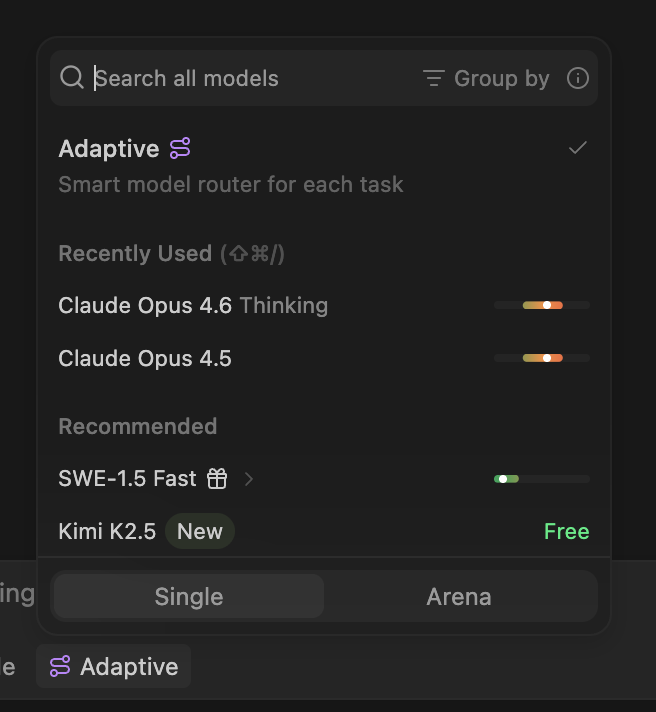
Download 1.9600.1040
Download 1.9600.1040
Introducing Adaptive
We’ve made several model packaging changes, with more info here.Adaptive Model Router
A new Adaptive model option is now available in the model picker. Adaptive intelligently selects the best model for each task, helping you make your quota last longer by avoiding overuse of premium models.- Availability: Now available to all self-serve users on Pro, Max, and Teams plans.
- Dynamic model selection - Automatically chooses the right underlying model for your task while drawing down quota at a fixed per-token rate.
- Extra usage promo - Beyond your quota, extra usage is offered at 0.50 USD per 1M input tokens, 2.00 USD per 1M output tokens, and 0.10 USD per 1M cache read tokens for the next 2 weeks.
Download 1.9600.1038
Download 1.9600.1038
Token Tracking in Response Card
- Added token usage tracking to the response card. You can now see a breakdown of input tokens, output tokens, and cached input tokens for each response directly in the chat panel.
- Enhanced the context window indicator to show when the prompt cache expires, giving you better visibility into cache utilization.
Bug Fixes and Improvements
- Fixed keyboard input issues with the built-in terminal on Windows
- Improved cost sorting for token-based plans in the model picker
- Clarified which models are available only on pro plans
- Repaired devcontainer support on RHEL 8
Download 1.9600.1032
Download 1.9600.1032
Download 1.9600.1009
Download 1.9600.1009
Download 1.9600.1008
Download 1.9600.1008
Download 1.9600.1006
Download 1.9600.1006
Cascade
- Fix dangling Diff Zones related to Jupyter Notebooks
- Improve Jupyter Notebook performance when running on WSL
Download 1.9577.1024
Download 1.9577.1024
Cascade
- Improve Cascade UI rendering performance
- Fix Cascade agent crashes under certain conditions
- Improve notifications for model price changes
- Add support for loading SKILL.md files from the
.windsurf/skills/directory - Fix
AGENTS.mdbeing ignored by Cascade in specific cases
MCP
- Add support for system-level Skill definitions via MDM-managed configs for Enterprise
- Improve context management for MCP servers
Stability & Performance
- Improve autocomplete error handling and performance
- Improve SSH & Remote performance
Download 1.9577.1020
Download 1.9577.1020
New Model Picker
We introduced a new model picker that groups models by family and adds a hovercard with toggles for specific variants, like reasoning effort and speed. Separately, we also added the ability to pin models.Cascade Improvements
- Added
POST_CASCADE_RESPONSE_WITH_TRANSCRIPTcascade hook - Added Cascade hooks configuration visibility on team settings page
- Reduced the priority of Git commits in @ mention search
- Added a
devin.cascade.readClaudeCodeConfigflag to disable reading Claude configuration
MCP Improvements
- Added an MCP Refresh button
- Auto-trigger OAuth login when adding HTTP/SSE MCP servers
- Fix bugs with parsing on Windows and startup
Platform Improvements
- Merged changes from VS Code 1.108
- Improved startup reliability for Cascade
- Fixed Windows update initialization path that could block updates
- Released binaries for Linux ARM64
Download 1.9566.1009
Download 1.9566.1009
Download 1.9566.1006
Download 1.9566.1006
Bug Fixes and Improvements
- Fix compatibility with GitHub Pull Requests extension
Download 1.9552.1025
Download 1.9552.1025
Bug Fixes and Improvements
- Fix for self-updating on Windows
- Fix for macOS UI flickering
Download 1.9552.1024
Download 1.9552.1024
Cascade Improvements
- Plan Mode now supports automatic switching back to Code Mode when you start implementing a plan
- Added support for reading skills from the
.agents/skillsdirectory - Tracking triggered rules in the
post_cascade_responsehook via a newrules_appliedfield - Diff zones will now automatically close on commit
Linux ARM64 Support
- Full Linux ARM64 client support with deb and rpm packaging
Enterprise & Team Improvements
- Cloud configuration for Cascade Hooks is now available for enterprise teams via the cloud dashboard
- Support for Devin service key authentication
Bug Fixes and Improvements
- Fixes for
post_write_codehooks to handle all code editing tool formats - Fixes and improvements for MCP server resource loading
- Fixed osascript privilege escalation being incorrectly triggered on Linux for shell command installation
- Addressed multiple memory leaks
- Improved RTL language rendering in todo lists
Download 1.9552.1021
Download 1.9552.1021
Download 1.9544.1042
Download 1.9544.1042
New Models
- GPT-5.3-Codex-Spark is now available in Arena Mode’s Fast Arena and Hybrid Arena battle groups
Claude Opus 4.6 (fast mode)
Claude Opus 4.6 (fast mode) is now available in Windsurf in research preview with limited-time promotional pricing for self-serve users until Feb 16:- No thinking: 10x credits
- With thinking: 12x credits
Bug Fixes and Improvements
- Fix issues with Arena Mode Battle Groups
Download 1.9544.1028
Download 1.9544.1028
Bug Fixes and Improvements
- Improve UI styling for announcement popups and notifications
- Close model picker when selecting a battle group
Download 1.9544.1026
Download 1.9544.1026
Wave 14: Arena Mode
Arena Mode brings side-by-side model comparison directly into your IDE, plus Plan Mode for smarter task planning.Arena Mode
Run two Cascade agents side-by-side with hidden model identities and vote on which performs better. Arena Mode lets you discover which models actually work best for your workflow, codebase, and tasks—not just what benchmarks or influencers say.- Battle Groups: Choose specific models to compare or let Windsurf randomly select from curated groups like “fast models” vs “smart models”
- Personal & Global Leaderboards: Your votes contribute to both a personal leaderboard (your preferences) and a global one (across all Windsurf users)
- Sync or Branch: Send followup prompts to both agents simultaneously, or branch and explore different paths individually
Plan Mode
Plan Mode is a new Cascade mode alongside Code and Ask. Use it to create detailed implementation plans before diving into code.Pro tip: Typemegaplan in the Cascade input box to trigger an advanced form that asks clarifying questions to create a more aligned, comprehensive plan.Bug Fixes and Improvements
- Admins can now set a default model that applies to all team members when they first open Windsurf
- Various bug fixes and performance improvements
Download 1.9544.1018
Download 1.9544.1018
Download 1.9544.1001
Download 1.9544.1001
Enterprise Features
- Enterprise admins can now specify organization-wide allow and deny lists for command auto-execution. Learn more
Bug Fixes and Improvements
- Bug fixes and performance improvements for diff zones
- Improved overall stability and reliability
- Added
post_setup_worktreehook for initializing worktrees in Cascade
Download 1.13.113
Download 1.13.113
Bug Fixes and Improvements
- Improvements to GPT-5.2-Codex harness
- Admins can now manage Windsurf restrictions via Windows Group Policy
Download 1.13.110
Download 1.13.110
GPT-5.2-Codex
Adds support for GPT-5.2-Codex with four reasoning efforts (low, medium, high, and xhigh). GPT-5.2-Codex is OpenAI’s latest model designed for agentic coding. It excels at working in large codebases over long sessions. For most tasks, we recommend using the medium reasoning effort.Bug Fixes and Improvements
- Various bug fixes and performance improvements
- Improved stability and reliability
Download 1.13.109
Download 1.13.109
Bug Fixes and Improvements
- Various bug fixes and performance improvements
- Improved stability and reliability
Download 1.13.108
Download 1.13.108
Gemini 3 Flash
Gemini 3 Flash is now available for all users. This model combines Gemini 3 Pro-grade reasoning with Flash-level speed and efficiency, making it ideal for agentic workflows and coding tasks.- Blazing Fast Responses: Experience near-instant feedback with 3x faster performance than previous generations, perfect for iterative development compared to Gemini 3 Pro
- Superior Coding Intelligence: Outperforms even Pro-tier models on key coding benchmarks (78% on SWE-bench Verified), providing more accurate code generation and debugging
- Deep Multimodal Understanding: Easily process complex video, data extraction, and visual Q&A tasks with frontier-level reasoning
Bug Fixes and Improvements
- Various bug fixes and performance improvements
- Tab fixes and improvements
Download 1.13.106
Download 1.13.106
Wave 13: Merry Shipmas
Wave 13 brings first-class support for parallel, multi-agent sessions in Windsurf, along with Git worktrees, side-by-side Cascade panes, and a dedicated terminal profile for more reliable agent execution.SWE-1.5 Free
Our near-frontier model, SWE-1.5, is now available for free to all users for the next 3 months. SWE-1.5 Free has the full intelligence of SWE-1.5, with the same coding performance on SWE-Bench-Pro, but delivered at standard throughput speeds. The original variant of SWE-1.5 hosted on Cerebras will continue to be available for paid users. SWE-1.5 Free will replace SWE-1 as the default model in Windsurf starting today.Git Worktree Support
Windsurf now supports Git worktrees, letting you spawn multiple Cascade sessions in the same repository without conflicts. Git worktrees check out different branches into separate directories while sharing the same Git history.Multi-Cascade Panes & Tabs
You can already run multiple Cascade sessions in Windsurf at the same time. Now, you can view and interact with them in separate panes and tabs within the same window. This lets you monitor progress and compare outputs of sessions side-by-side, or even turn Windsurf into a big Cascade dashboard.Cascade Dedicated Terminal (Beta)
Windsurf introduces a new approach for letting agents execute terminal commands. Instead of your default shell, Cascade will now run commands in a dedicated zsh shell specifically configured for reliability. The Cascade Dedicated Terminal can use the environment variables you set in your .zshrc configuration and is interactive, which means you can answer any prompts from shell scripts without having to break your flow. This should improve the reliability and speed of shell commands, especially for users with complicated prompts (e.g., powerlevel10k).In this version, the Cascade Dedicated Terminal will be opt-in for Windsurf Stable on macOS. If you are experiencing issues with the older legacy terminal, we recommend switching to the new terminal early. We expect to make this feature the default in the future, while maintaining the legacy terminal extension for backwards compatibility purposes. You can opt-in in the Windsurf User Settings -> Disable Windsurf Legacy Terminal Profile.Context Window Indicator
When a model’s context window grows too long, earlier context can be dropped without warning and performance can degrade. Cascade already extends the window by occasionally summarizing messages and clearing history. This release adds a visual indicator to see how much of your context window is currently in use, helping you anticipate limits and decide when to start a new session.Cascade Hooks
Execute custom commands at key points during Cascade’s workflow, including on model response for auditing purposes.System-level Rules & Workflows
Enterprises can deploy rules and workflows via MDM policies, allowing organizations to place rules and workflows files on users’ machines.Bug Fixes and Improvements
- Enhanced diff zone behavior with configurable scroll-to-next-hunk settings (default off)
- Preserved colors and styling in Cascade terminal output
- Multiple fixes to the Model Context Protocol implementation
- Supports lowering permissions for Cascade’s Web Fetch tool
- Fix race condition in the dedicated terminal implementation
- Support force killing commands in the dedicated terminal
- Improved markdown completion
- Fix opening old Cascade diffs
Download 1.13.104
Download 1.13.104
Bug Fixes and Performance Improvements
- Fix race condition in the new dedicated terminal implementation
- MCP fixes
- Added setting to control scroll-to-next-hunk behavior in diff zones (default off)
- Improve markdown completion
- Preserve terminal colors and styling in the Cascade terminal output pane
- Diff zone fixes and improvements
- Support turbo mode for web fetch requests made by Cascade’s Web Fetch tool
- Support force killing commands in the new dedicated terminal
Download 1.12.167
Download 1.12.167
New Features
Windsurf Dedicated Terminal
- Introduces a new terminal for Cascade that improves command execution reliability (OS X only)
Multi Cascade Panels and Tabs
- Adds support for multiple Cascade panels and tabs, allowing users to work with multiple Cascade sessions simultaneously
Cascade Hooks on Cascade Response
- Allows users to configure Cascade Hooks on model response, specifically for logging all Cascade responses for auditing purposes
System-level Rules + Workflows
- Allows enterprises to place rules and workflows files on users’ machines with MDM policies
Bug Fixes
- Fix opening old Cascade diffs
- Fix various stability issues with the new terminal implementation
Download 1.12.166
Download 1.12.166
Features
Added a new “Promo” label to LLM models that are newly available or have special discount pricingPatch Fixes and Improvements
- Enhances code block file path display to hide line numbers for whole files
- Improves citation and language parsing in code blocks with a more robust regex pattern
- Updates the UI for code block title bars to properly handle long paths with truncation
- Fixes fallback diff handling for nonexistent files in code actions
- Improves the auto-run command menu interface and its display logic
Download 1.12.164
Download 1.12.164
Patch Fixes and Improvements
Agents & Tool Execution
- Fixed Command-I functionality
- Fixed Ctrl+C during tool execution not working properly
- Fixed Go (fallback) processes not being killed properly
- Fixed handling of parallel tool call errors
UI & Rendering
- Fixed incorrect indentation from code blocks in terminal rendering
- Fixed nested lists not rendering on new line in terminal markdown
- Fixed content spacing issues
- Fixed streaming flashes
Messaging & Platform
- Fixed rate limit error message to say “no credits were used” instead of “credits have been refunded”
- Fixed continuously rechecking for updates on macOS
- Added a user-facing message when API providers are exhausted
Tooling & Onboarding
- Improved MCP tool call visibility (show tool name, args, etc)
- Added loading indicators when thinking or during long running operations
- Allowed clicking items in the Windsurf onboarding pane
- Respected gitignore patterns in the workspace directory tree
Download 1.12.163
Download 1.12.163
Patch Fixes and Improvements
- Reduce occurrence of “prompt is too long” errors
- Request all supported scopes if no scopes are provided in MCP OAuth config
Download 1.12.162
Download 1.12.162
GPT-5.2
GPT-5.2 is now available in Windsurf. This model will be available for 0x credits in Windsurf (to paid users) for a limited time.GPT-5.2 represents the biggest leap for GPT models in agentic coding since GPT-5 and is a SOTA coding model in its price range. The version bump undersells the jump in intelligence. We`re excited to make it the default across Windsurf and several core Devin workloads. - Jeff Wang, CEO of WindsurfDownload the latest version on Windsurf to try it out!Bug fixes and improvements
- General Windsurf stability and performance improvements
- General Tab (Supercomplete) improvements and stability
- Fixes issues with Cascade running commands that could not be cancelled during certain long-running processes
Download 1.12.161
Download 1.12.161
Diff Zones
- Fixes issues with diff zones not rendering correctly or jumping to the end of a file when editing
Lifeguard
- Fixes various Lifeguard bugs and stability issues
Tab (Supercomplete)
- Improves reliability of Tab autocomplete
- Makes Tab more responsive and faster in the appropiate circumstances
MCP Servers
- Added support for MCP prompts
- Added toggles to enable/disable MCPs in the Cascade header
Bug fixes and improvements
- General stability and performance improvements
- Fixes issues with login timing out too quickly during onboarding
Download 1.12.160
Download 1.12.160
Features & Tools
Cascade Hooks on User Prompts
- Users can now configure Cascade Hooks on user prompts for logging all user prompts and blocking policy-violating prompts.
Worktree / Arena Mode
- Added support for Worktree and Arena Mode.
MCP Servers
- Added support for GitLab remote MCP.
- Added OAuth support for GitHub remote MCP.
- Fixed an issue where every MCP would reauth on opening Windsurf.
General Improvements
- General performance and stability improvements.
- Improvements for Tab (Supercomplete) autocomplete reliability.
Download 1.12.158
Download 1.12.158
GPT-5.1-Codex Max
Introducing GPT-5.1-Codex Max in three reasoning tiers (Low, Medium, High). Low variant available at no cost to paid users for a limited time.Download 1.12.157
Download 1.12.157
Claude Opus 4.5
You can now use Claude Opus 4.5 in Windsurf!Opus 4.5 is the most capable model in Windsurf yet and is now available at Sonnet pricing for a limited time (2x credits compared to 20x for Opus 4.1).This model is available to all paid Windsurf subscribers.Download 1.12.153
Download 1.12.153
AI Models
Gemini 3 Pro
- You can now use Gemini 3 Pro (Low and High) in Windsurf! This is a preview release that is available to paid Trial, Pro, and Teams subscribers and will soon be extended to Enterprise users as well.
- Resolved an issue where Gemini 3 Pro caused internal Cascade errors for some users.
SWE-1.5
- Fixed notebook tool functionality for SWE-1.5.
- Addressed an issue where SWE-1.5 would unexpectedly stop or return “No response requested”.
Sonnet 4.5
- Added support for Sonnet 4.5 with a 1M token context window.
- Reduced the frequency of unnecessary Markdown file creation by Sonnet 4.5.
GPT-5.1 Codex and Codex Mini
- Added support for GPT-5.1 Codex and Codex Mini with low reasoning effort configuration.
Features & Tools
Codemaps
- Improved reliability of saving and retrieving Codemaps.
- Fixed Codemap sorting and increased the limit of visible open Codemaps.
- Resolved issues with mentioning Codemaps in Cascade.
MCP Servers
- Fixed scope handling and OAuth authentication flows for various MCP servers.
- Resolved issues preventing installation of new MCP servers.
- Added support for handling embedded resource content in tool call responses.
Tab Completion
- Improved latency, responsiveness, and accuracy of autocomplete.
Vibe and Replace
- Fixed reliability issues with Vibe and Replace.
Fast Context
- Added support for
.codeiumignoreand.gitignorefor Fast Context.
General Improvements
- Fixed various UI alignment issues with icons and styles.
- General performance and stability improvements.
- Fixed issues with the file search tool.
Download 1.12.152
Download 1.12.152
Worktree Preview
You can now use Windsurf’s AI agent with worktrees to explore and modify code across multiple branches simultaneously.MCP Server Improvements
- Fixes issues with scopes and OAuth authentication flows for multiple MCP servers
Tab Completion
- Improved latency, responsiveness, and accuracy of autocomplete.
Context Window Indicator Beta
- Context window indicator now shows the current context window used by the Cascade AI agent.
Download 1.12.150
Download 1.12.150
GPT-5.1 Priority Mode
- Added priority processing support for GPT-5.1 models, providing guaranteed low-latency responses for faster (~50 tokens/sec), more reliable AI assistance.
- Priority processing costs 2x the standard rate, which will be reflected in the Windsurf credit system.
Patch Fixes and Improvements
- Fixed tool call calling issues for GPT-5.1-Codex and GPT-5.1-Codex Mini models
Download 1.12.149
Download 1.12.149
GPT-5.1 and GPT-5.1-Codex
GPT-5.1 and GPT-5.1-Codex are now available in Windsurf. GPT-5.1 will become the default model in Windsurf for one week, and paid users get free access during this period.GPT-5.1 and GPT-5.1-Codex deliver a solid upgrade from GPT-5 for agentic coding workflows. They’re noticeably better at understanding what you’re asking for and working with you to get it done. The new variable thinking feature dynamically adjusts reasoning depth—providing quick responses for simple tasks and more thoughtful analysis when complexity demands it.Patch Fixes and Improvements
Removed Features
- Knowledge Base: Removed the Knowledge Base feature
Bug Fixes
- PowerShell + Turbo Mode: Fixed an issue where PowerShell was not running commands when Turbo Mode is enabled
Shortcuts
- Attach current file to Cascade: New shortcut
Option/Alt+Cmd+Lwhen in an editor to attach the current file to Cascade
Download 1.12.148
Download 1.12.148
Features
MCP Improvements
- Loading state indicators: Show loading state per installed MCP to improve visibility during initialization
- Refresh only edited MCPs: When
mcp_config.jsonis modified, only the affected MCP server instance is initialized/refreshed - no other instances are refreshed - Increased initialization timeout: MCP initialization timeout increased to 60s
- Refresh button for error states: Show refresh button for MCPs in error state to allow manual recovery
Cascade Hooks
- Enterprise feature: New Cascade Hooks feature available
- Public documentation: Draft documentation with details and descriptions of hooks available in Windsurf Docs
Bug Fixes
- Vim extension typing lag: Fixed bug causing typing lag when Vim extension is enabled
SWE 1.5 Image Support
- Image understanding: Images are now supported in SWE 1.5, enabling visual content analysis
Download 1.12.144
Download 1.12.144
Features
Expanded Codemaps
Codemaps now include powerful new capabilities:- Chat with map - Interact directly with your codebase visualizations
- Mermaid diagrams - Generate visual diagrams within maps for better code understanding
- Cascade suggestions - Get AI-powered suggestions directly in your maps
- Map option in chat/edit nudges - Easily create maps from chat and edit interactions
- Smart mode option - Enhanced intelligent assistance when working with maps
Cascade Summarization Fix
Improved Cascade summarization to better handle longer conversations. Previously, summaries could be too aggressive and drop important context. Now maintains better continuity across long sessions with multiple file changes and user messages.Sonnet 4.5 Support for SWE 1.5 Planning
You can now enable beta Sonnet 4.5 planning when using SWE 1.5. To enable, select SWE 1.5 first, then select the Sonnet 4.5 addon.MCP Enhancements
- Path component handling - Improved support for MCP URLs with path components (e.g., Smithery MCPs)
- OAuth flow improvements - Better OAuth flow for streamable HTTP MCPs (e.g., Canva, ServiceNow’s internal MCP)
Bug fixes and improvements
Performance Improvements
- Sticky scroll lag fixes - Resolved lag spikes when using sticky scroll with Vim bindings
- General slowness fixes - Addressed performance issues caused by VSCode OSS update
- Terminal rendering optimization - Fixed rendering loop that caused 500ms+ delays on first terminal open
Terminal Fixes
- PowerShell improvements - Fixed Windows terminal integration issues where commands would appear stuck
- Shell theme compatibility - Resolved edge cases with custom shell themes (zsh, fish, powerlevel10k, etc.) that could cause Windsurf to break or show stuck commands
Editor Stability
- Terminal freeze fix - Fixed an issue where the editor would freeze when opening the terminal
- CMD+J fix - Resolved layout thrashing issue when opening terminal pane with CMD+J
Download 1.12.142
Download 1.12.142
Features
New beta plan mode (type /plan in the Cascade chat input to activate it).Expanded Codemaps:- Chat with map
- Mermaid diagrams in maps
- Cascade suggestions for maps
- Chat / edit nudge includes “map option”
- Smart mode option
Bug fixes and improvements
- Fixes for lag spikes when using sticky scroll
- Fixes for general slowness caused by VSCode OSS update
- Powershell fixes for Windows terminal integration / commands appearing stuck.
- Fixes for certain edge cases around shells with custom themes.
- Fixed an issue where the editor would freeze when opening the terminal
Download 1.12.140
Download 1.12.140
Patch Fixes and Improvements
- Support and fixes for AGENTS.md
- Improvements and bug fixes for Codemaps.
- Improvements to Fast Context. Enterprises can opt in using the Windsurf Team Settings. Users can toggle Fast Context automatically using “CMD/Ctrl + Enter” on the first message in a chat.
- New auto-linting behavior that speeds up Cascade.
- Fix for MCP Marketplace not respecting team allowlist options.
- Fixes for Jupyter Notebook tool.
- Fixes for Memories, Rules, and Workflows.
- General bug fixes and improvements.
- Performance optimizations and stability enhancements.
Dependencies
- Updated Code OSS to version 1.105.0 (Electron: 37.6.0, Chromium: 138.0.7204.251)
Download 1.12.136
Download 1.12.136
Patch Fixes
- Early preview of Windsurf’s new Tab model.
- Bug fixes and improvements.
Download 1.12.130
Download 1.12.130
Patch Fixes
- Fixes issues with the experimental Cascade tool for finding context not working properly.
- Improvements and bug fixes for the beta Codemaps feature.
- Improvements to the Lifeguard (Beta) feature.
- Fixes issue with custom MCP servers not being displayed correctly in the new MCP panel.
- Fixes issue where some bash commands would get stuck.
- Fixes issue where certain models couldn’t create or edit Jupyter notebooks.
- General bug fixes and improvements.
Download 1.12.127
Download 1.12.127
Patch Fixes
- Various improvements to the experimental Cascade tool which searches and finds relevant files.
Download 1.12.126
Download 1.12.126
Experimental Cascade Tool
- Experimental Cascade tool to quickly search for files and find relevant context.
Download 1.12.125
Download 1.12.125
Lifeguard
- Beta preview of lifeguard, a tool to help you find and resolve bugs inside your IDE.
Download 1.12.121
Download 1.12.121
Patch Fixes
- Fix using MCP tools with certain models.
- Fixes to terminal issues on Windows.
Download 1.12.117
Download 1.12.117
GPT-5-Codex is now in Windsurf!
GPT-5-Codex is now available for free (0x credits) for a limited time for paid users!Free users can use GPT-5-Codex as well for 0.5x credits.Download 1.12.114
Download 1.12.114
Speak to Cascade
Voice
- Users can now speak into the chat rather than having to type things out.
@-mentioning conversations
- @-mention the first conversation so Cascade has full context of it as it goes to write tests for you.
Deeper Browser integration
- Chat with Cascade about tabs that are open in the Browser using @-mentions
JetBrains improvements
- Planning Mode, Workflows, and file-based Rules are now available for Cascade on JetBrains
Improvements
- Now you can @-mention terminal in Cascade.
- You can turn on the Auto-Continue setting to have Cascade automatically continue its response if it hits a limit.
- Support for more MCP servers with easier and more secure authentication by integrating the new Streamable HTTP transport (replaces SSE) and MCP authentication (replaces access tokens or API keys in the config).
- Important for enterprise customers who use Windsurf across lots of repos. Now, you can enforce ignore rules across all repositories by placing .codeiumignore in the ~/.codeium/ folder
Download 1.11.100
Download 1.11.100
Updates
- Removal of legacy mode
- Icons in @-mentions
- Theme-aware codeblocks with refreshed design
- Native terminal in Cascade panel
Download 1.10.100
Download 1.10.100
New Family of SWE-1 Models
- Based on the latest release of the Windsurf Editor, v1.9.0
Download 1.9.100
Download 1.9.100
Improvements
Some improvements to app icons, fixes to SSH server connection, and UI Polish for Cascade Plugins.Download 1.8.102
Download 1.8.102
New Features
Cascade Plugin Panel
- New panel in Cascade for managing MCP Servers
- Easier one-click uninstall and install
- Easier search
- MCP now has MCP resources and multimodel responses
- More MCP Server options coming soon
Cascade Customization Panel
- Revamped Memories panel to include rules, workflows, and memories
Revamped rules
- Support for workspace-style rules in
.windsurf/rules - Custom triggers when to activate a rule
Workflows
- Support for quick instructions for Cascade to take on mini-tasks
.windsurf/workflowshouses workflows that Cascade can do in the current workspace- Workflows can be found as slash commands (/) in the Cascade input
Cascade Improvements
- Conversation sharing with a teams-only accessible URL
Misc
- Redesigned Model Selector
- Continue button when reaching individual tool call limit
- Hunk accept/reject widget now has a compact mode to cover less code
- Tab respects files mentioned in
codeiumignore
Download 1.8.101
Download 1.8.101
New App Icon & Upgraded Free Tier
Based on the latest release of the Windsurf Editor, v1.7.2Download 1.7.103
Download 1.7.103
Experimental Improvements
- Bug fixes
- Performance optimizations
- VS Code 1.98.0 Updates
Download 1.7.101
Download 1.7.101
Updated and Simplified Pricing
- We’re simplifying our pricing model by removing Flow Action Credits
- Change takes effect April 21st, 2025
- Plans now come with prompt credits with add-on credits available for purchase
User Prompt Credits
- Plans now come with prompt credits, which are consumed per every message sent and not via every tool call
- Add-on credits are available for purchase
- Auto-top off (with max limits) can be enabled via profile
Existing Plans
- Existing plans are migrating over to the new pricing model
- For more information, please visit the Pricing page
Download 1.7.100
Download 1.7.100