> ## Documentation Index
> Fetch the complete documentation index at: https://docs.devin.ai/llms.txt
> Use this file to discover all available pages before exploring further.
# 清理工程积压
> 让 Devin 为你清理工程积压
export const PromptBlock = ({children, type, agent, intent, playbookId}) => {
var utm = 'utm_source=docs&utm_medium=use-case-gallery&utm_campaign=prompt-block';
var tag = 'docs-use-case-gallery';
var agentParams = (agent ? '&agent=' + agent : '') + (intent ? '&intent=' + intent : '') + (playbookId ? '&playbookId=' + playbookId : '');
var label = type === 'schedule' ? 'Schedule in Devin' : type === 'playbook' ? 'Create Playbook' : type === 'knowledge' ? 'Add to Knowledge' : agent === 'advanced' ? 'Try in Devin' : agent === 'dana' ? 'Try in Dana' : agent === 'ada' ? 'Try in Ask Devin' : 'Try in Devin';
var buildUrl = function (text) {
var encoded = encodeURIComponent(text);
if (type === 'schedule') return 'https://app.devin.ai/settings/schedules/create?' + utm + agentParams + '&prompt=' + encoded;
if (type === 'playbook') return 'https://app.devin.ai/settings/playbooks/create?' + utm + '&body=' + encoded;
if (type === 'knowledge') return 'https://app.devin.ai/knowledge?' + utm + '&body=' + encoded;
if (agent === 'ada') return 'https://app.devin.ai/search?' + utm + '&noSubmit=true&prompt=' + encoded;
return 'https://app.devin.ai/?tags=' + tag + '&' + utm + agentParams + '&prompt=' + encoded;
};
const ref = React.useRef(null);
const [href, setHref] = React.useState('#');
React.useEffect(() => {
if (!ref.current) return;
var codeEl = ref.current.querySelector('pre code');
if (codeEl) {
var text = codeEl.textContent.trim();
if (text) setHref(buildUrl(text));
}
var header = ref.current.querySelector('[data-component-part="code-block-header"]');
if (header && !header.querySelector('.prompt-block-devin-link')) {
var link = document.createElement('a');
link.href = href;
link.target = '_blank';
link.rel = 'noopener noreferrer';
link.className = 'prompt-block-devin-link';
link.style.cssText = 'display:inline-flex;align-items:center;gap:6px;text-decoration:none;color:#fff;font-size:11px;font-weight:500;padding:4px 10px;border-radius:6px;white-space:nowrap;background:#317CFF;transition:background 0.2s;margin-left:8px;';
link.innerHTML = ' ' + label;
link.onmouseenter = function () {
link.style.background = '#2968D9';
};
link.onmouseleave = function () {
link.style.background = '#317CFF';
};
header.appendChild(link);
}
var existingLink = ref.current.querySelector('.prompt-block-devin-link');
if (existingLink && href !== '#') existingLink.href = href;
});
return {children}
;
};
## 概览
Devin 可以帮助你在 GitHub、Jira 和 Linear 等平台上管理和整理 issue 待办列表,将待办维护中繁琐的工作自动化处理,同时确保你的团队专注于最重要的任务。
## 常见待办事项管理场景
在 GitHub Issue 中 @Devin,以启动一个新的 Devin 会话。
### 如何设置
1. 将 [devin-on-label.yml](https://github.com/ankehao-demo/COBOL-Demo/blob/main/.github/workflows/devin-on-label.yml) 推送到任意 GitHub 仓库下的 `.github/workflows` 文件夹
2. 创建一个名为 **`devin`** 的 GitHub Issue 标签
3. 在 GitHub 仓库的 Secrets 中添加来自你 Devin 组织的 Devin API Key,名称为 `DEVIN_API_KEY`
### 工作原理
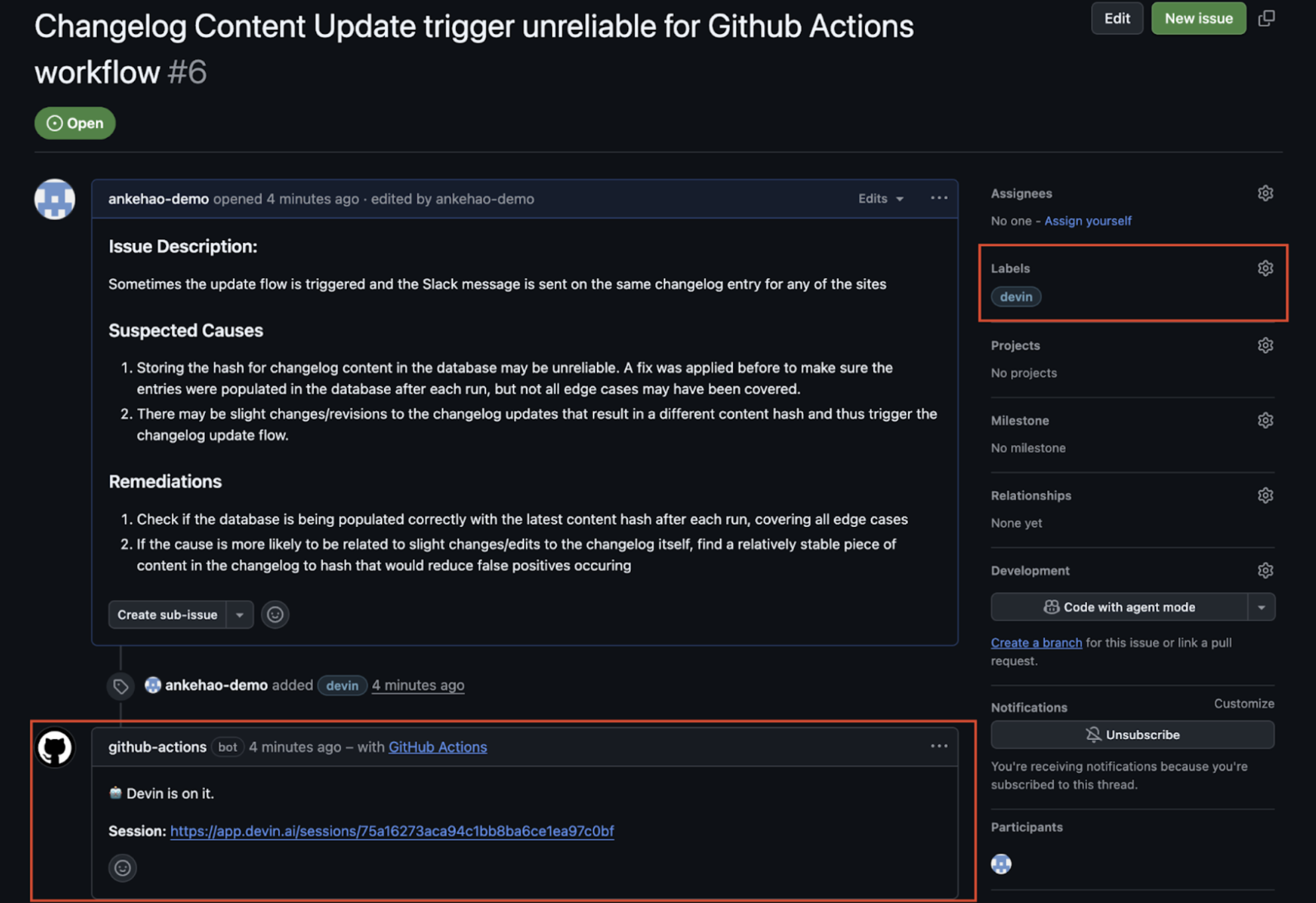
1. 给 Issue 添加 **`devin`** 标签 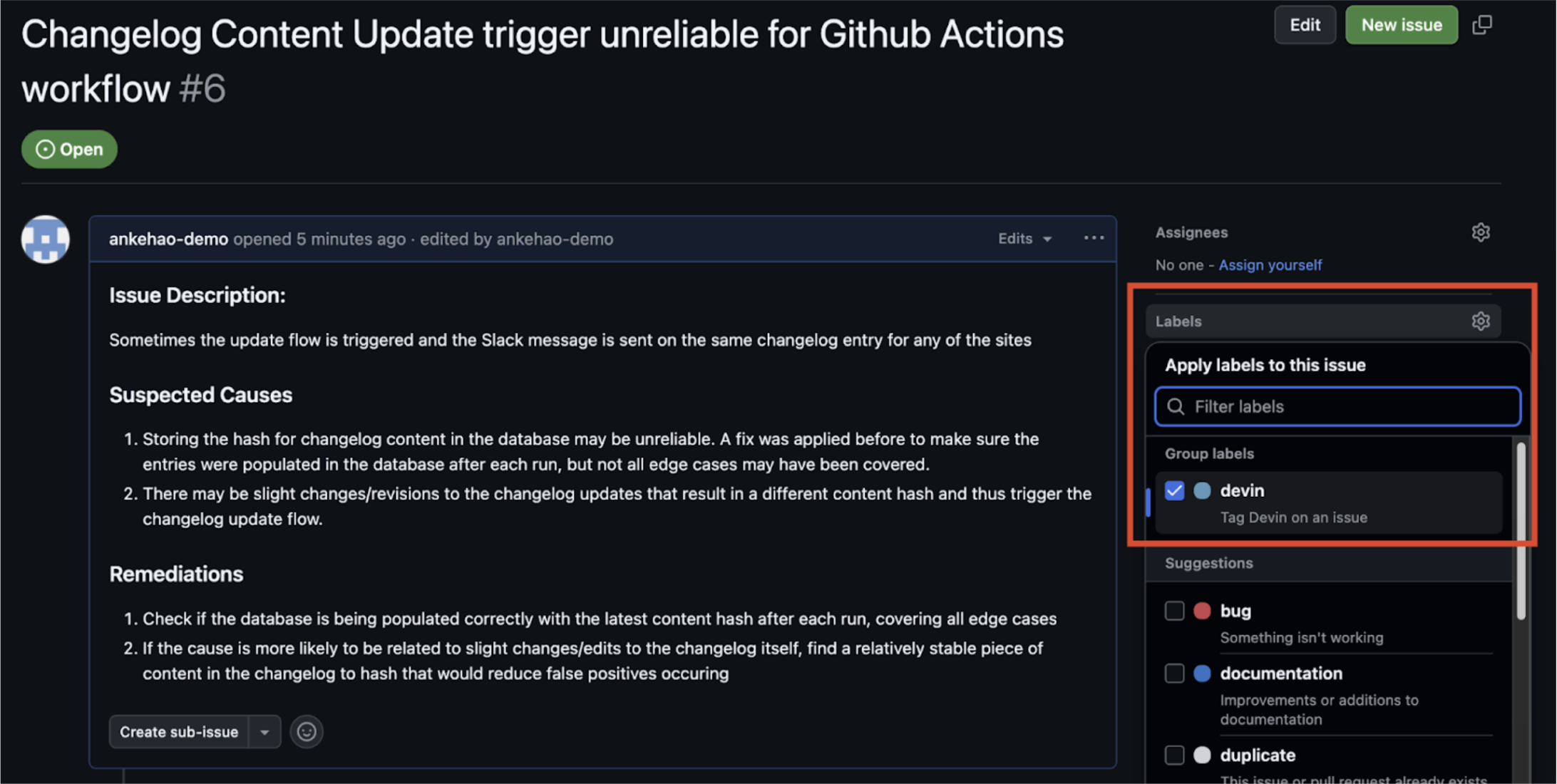 2. 触发 GitHub Actions 工作流,并在该 Issue 下自动创建一条评论,其中包含指向新 Devin 会话的链接
3. Devin 会话会自动启动
2. 触发 GitHub Actions 工作流,并在该 Issue 下自动创建一条评论,其中包含指向新 Devin 会话的链接
3. Devin 会话会自动启动
 ### Jira 和 Linear 集成
Devin 可以直接与 Jira 和 Linear 集成,帮助你管理 Issue 待办列表 (backlog) 。你可以在这两个平台上将工单分配给 Devin,并让它们自动转化为拉取请求 (PR) 。
有关详细的设置步骤和配置选项,请参阅 [Jira 集成指南](/zh/integrations/jira) 和 [Linear 集成指南](/zh/integrations/linear)。
### Jira 和 Linear 集成
Devin 可以直接与 Jira 和 Linear 集成,帮助你管理 Issue 待办列表 (backlog) 。你可以在这两个平台上将工单分配给 Devin,并让它们自动转化为拉取请求 (PR) 。
有关详细的设置步骤和配置选项,请参阅 [Jira 集成指南](/zh/integrations/jira) 和 [Linear 集成指南](/zh/integrations/linear)。
## 相关用例
* [测试与重构](/zh/use-cases/testing-refactoring)
* [迁移与现代化](/zh/use-cases/migration-modernization)