> ## Documentation Index
> Fetch the complete documentation index at: https://docs.devin.ai/llms.txt
> Use this file to discover all available pages before exploring further.

# Devin Outposts

> 在你自己的基础架构上运行 Devin 会话

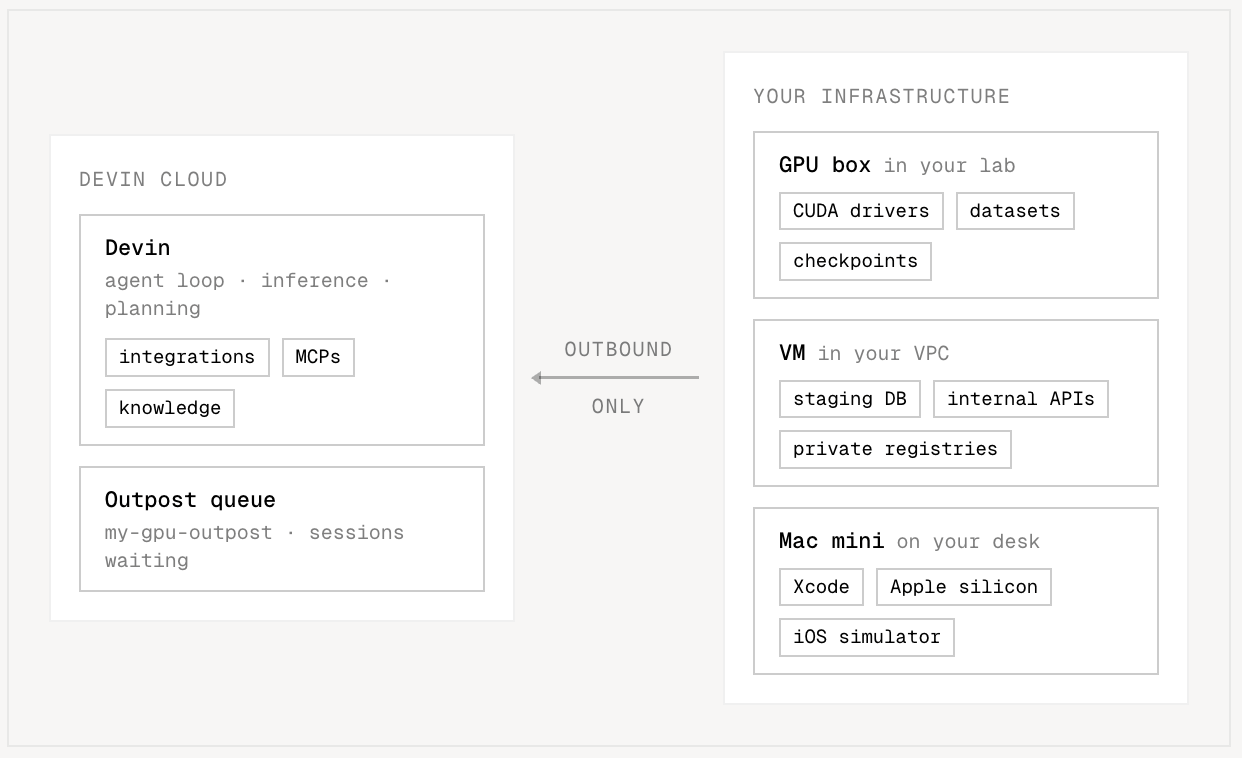
Outposts 让你可以在自己掌控的基础架构中运行 Devin 会话——无论是你自己的 VM、容器、Kubernetes 集群，还是桌上的一台 Mac Mini。Devin 的 agent 循环 (推理和规划) 仍在 Devin 云端运行，而所有命令执行、文件编辑和代码仓库访问都在你管理的机器上完成。

如果你有以下需求，请使用 Outposts：

* 让会话在你的网络内部运行，并靠近内部服务、制品仓库和 secrets
* 自定义硬件配置 (例如 GPU、大内存机器、特定的操作系统镜像)
* 使用现有的开发机、VM 或 Kubernetes 基础架构承载 Devin 工作负载
* 对网络访问、构建产物和监控进行企业级控制

<Frame>
  <img src="https://mintcdn.com/cognitionai/xlfcZs3jVVOLjL3w/images/onboard-devin/outposts/outposts-diagram.png?fit=max&auto=format&n=xlfcZs3jVVOLjL3w&q=85&s=798dd3f1d9ce57eb530b1c6d7d9e5b4b" alt="Devin 的 agent 循环和 outpost 队列运行在 Devin Cloud；你的机器——实验室中的一台 GPU 机器、VPC 中的一台 VM，或桌上的一台 Mac mini——通过仅出站连接提供会话服务" width="1242" height="758" data-path="images/onboard-devin/outposts/outposts-diagram.png" />
</Frame>

<div id="how-it-works">
  ## 工作原理
</div>

**outpost** 是一个具名队列，用于让 Devin 会话在你自己的机器上运行。注册 outpost (例如 `gpu-h200` 或 `dev-boxes`) 后，它会与 Ubuntu、Windows 等并列显示为 Devin Cloud 中的机器选项——在某个 outpost 上启动的云端会话会先在其队列中等待，直到你的某台机器将其接管。

每台为某个 outpost 处理会话的机器都是一个**工作器**。要将一台机器变成工作器，请安装 [Devin CLI](/zh/work-with-devin/devin-cli) 并运行：

```bash theme={null}
devin worker start --outpost=<outpost_name>
```

工作器会与 Devin 云端 建立出站连接，并监听 outpost 的队列。当有会话在等待时，工作器会接管该会话并在本地执行其工具调用——每条命令、每次文件编辑和每项代码仓库操作都在你的机器上运行。会话结束后，工作器会继续监听队列，等待下一个会话。要横向扩展，只需在更多机器上运行工作器：N 个工作器可同时处理 N 个会话，更多的会话则会在队列中等待，直到有工作器可用。

工作器只需要 **出站** HTTPS 访问。不需要入站端口、公共 IP 或 VPN 隧道。

<div id="orchestration">
  ### 编排
</div>

长期运行的工作器机器是最简单的配置方式，但借助 Outposts API，你也可以编写一个 **编排器**：一种监视 outpost 队列的软件，它会为每个正在等待的会话启动一个全新的 VM 或容器，在其中启动工作器，并在会话结束后销毁该机器。参见[编排](/zh/cloud/outposts/orchestration)了解具体方法，部署 [devin-outpost-k8s](https://github.com/CognitionAI/devin-outpost-k8s)——这是我们开源的 operator，可在任何 Kubernetes 集群上运行这一流程——或者在已为你实现该功能的合作伙伴平台上运行 (参见[集成](#integrations)) 。

<div id="machine-dependencies">
  ## 机器依赖
</div>

会话会直接在你的机器上运行，因此工作器依赖于你在这些机器上安装的工具。

| 依赖                     | 必填 | 用途                                                                                                                                                                     |
| ---------------------- | -- | ---------------------------------------------------------------------------------------------------------------------------------------------------------------------- |
| `git` (位于 `PATH` 中)    | 是  | 用于克隆及所有代码仓库操作                                                                                                                                                          |
| `ffmpeg` (位于 `PATH` 中) | 否  | Devin 的屏幕录制功能。没有它，会话将无法录制屏幕。                                                                                                                                           |
| Chrome 或 Chromium      | 否  | `Browser` 和 computer-use 功能。工作器默认会在标准安装位置查找 Chrome；如需覆盖此设置，请在工作器环境中将 `DEVIN_CHROME_PATH` 设为该二进制程序的绝对路径 (例如 `DEVIN_CHROME_PATH=/usr/bin/google-chrome`) 。没有它，浏览器工具将不可用。 |
| 无需密码的 `sudo`           | 否  | 让 Devin 能够在会话期间安装所需软件 (例如缺失的构建工具或系统软件包) 。仅当该机器专用于 Devin 且会在每次会话后回收时才授予此权限——切勿在共享机器或长期运行的机器上授予。                                                                         |

<div id="get-started">
  ## 快速开始
</div>

<CardGroup cols={2}>
  <Card title="快速入门" icon="rocket" href="/zh/cloud/outposts/quickstart">
    创建一个 outpost，并用单台机器通过 `devin worker start` 承载会话，无需 编排器。
  </Card>

  <Card title="编排" icon="diagram-project" href="/zh/cloud/outposts/orchestration">
    扩展到整个集群：轮询队列、领取会话、配置机器，并自动运行工作器。
  </Card>

  <Card title="参考" icon="book" href="/zh/cloud/outposts/reference">
    完整内容包括：CLI 命令和开关、fleet API 端点、二进制程序分发，以及 spawn 约定。
  </Card>
</CardGroup>

<div id="integrations">
  ## 集成
</div>

合作伙伴平台会替你实现整个编排循环——会话直接在它们的基础架构上运行，无需运行工作器，也无需构建编排器。每个合作伙伴都提供了各自的配置文档：

| 平台                                                                                                                                                                                                                                                                                                                                                                                                                                                                                                                                                                                                                                                                                                                                                                                                                                                                                                                                                                                                                                                                                                                                                                                                                                                                                                                                                                                                                                                                                                                                                                                                                                                                          | 你将获得                                                                     | 文档                                                                                                                      |
| --------------------------------------------------------------------------------------------------------------------------------------------------------------------------------------------------------------------------------------------------------------------------------------------------------------------------------------------------------------------------------------------------------------------------------------------------------------------------------------------------------------------------------------------------------------------------------------------------------------------------------------------------------------------------------------------------------------------------------------------------------------------------------------------------------------------------------------------------------------------------------------------------------------------------------------------------------------------------------------------------------------------------------------------------------------------------------------------------------------------------------------------------------------------------------------------------------------------------------------------------------------------------------------------------------------------------------------------------------------------------------------------------------------------------------------------------------------------------------------------------------------------------------------------------------------------------------------------------------------------------------------------------------------------------- | ------------------------------------------------------------------------ | ----------------------------------------------------------------------------------------------------------------------- |
| <img src="https://mintcdn.com/cognitionai/xlfcZs3jVVOLjL3w/images/onboard-devin/outposts/logos/namespace.svg?fit=max&auto=format&n=xlfcZs3jVVOLjL3w&q=85&s=68efa1dc7c7fd54050b64dd78cac12eb" alt="" style={{ display: "inline", verticalAlign: "middle", marginRight: "6px" }} noZoom width="16" height="16" data-path="images/onboard-devin/outposts/logos/namespace.svg" /> Namespace          | 基于 Apple silicon 的原生 macOS 环境——支持 Computer Use，Devin 可端到端构建、运行并测试 iOS 应用 | [Namespace 上的 Devin Outposts](https://namespace.so/docs/devbox/devin)                                                   |
| <img src="https://mintcdn.com/cognitionai/xlfcZs3jVVOLjL3w/images/onboard-devin/outposts/logos/modal.svg?fit=max&auto=format&n=xlfcZs3jVVOLjL3w&q=85&s=c4d687cff2da6b23ea3981b1265a07d0" alt="" style={{ display: "inline", verticalAlign: "middle", marginRight: "6px" }} noZoom width="16" height="16" data-path="images/onboard-devin/outposts/logos/modal.svg" /> Modal                                              | 与你训练和提供模型服务所用相同的基础架构——可在生产硬件上复现故障并分析修复效果，还能缩容至零                          | [Modal 上的 Devin Outposts](https://modal.com/docs/devin)                                                                 |
| <img src="https://mintcdn.com/cognitionai/xlfcZs3jVVOLjL3w/images/onboard-devin/outposts/logos/nvidia.svg?fit=max&auto=format&n=xlfcZs3jVVOLjL3w&q=85&s=d8c579390aae20eaca2df6e54be32418" alt="" style={{ display: "inline", verticalAlign: "middle", marginRight: "6px" }} noZoom width="28" height="16" data-path="images/onboard-devin/outposts/logos/nvidia.svg" /> OpenShell                                  | 通过 OpenShell 运行时为每个会话提供独立沙盒——从单台 VM 到 GPU 集群，专为安全和政府环境打造                 | [NVIDIA OpenShell 上的 Devin Outposts](https://github.com/NVIDIA/OpenShell#supported-agents)                              |
| <img src="https://mintcdn.com/cognitionai/xlfcZs3jVVOLjL3w/images/onboard-devin/outposts/logos/nvidia.svg?fit=max&auto=format&n=xlfcZs3jVVOLjL3w&q=85&s=d8c579390aae20eaca2df6e54be32418" alt="" style={{ display: "inline", verticalAlign: "middle", marginRight: "6px" }} noZoom width="28" height="16" data-path="images/onboard-devin/outposts/logos/nvidia.svg" /> Brev                                       | NVIDIA Brev 上的 GPU 实例，可通过一键 Launchable 部署                                | [NVIDIA Brev 上的 Devin Outposts](https://brev.nvidia.com/launchable/deploy?launchableID=env-3Ge1ZXazlZQuJHfQed2od9IT8R5) |
| <img src="https://mintcdn.com/cognitionai/xlfcZs3jVVOLjL3w/images/onboard-devin/outposts/logos/daytona.svg?fit=max&auto=format&n=xlfcZs3jVVOLjL3w&q=85&s=67c487847268e21d4b4c75fe01814d0f" alt="" style={{ display: "inline", verticalAlign: "middle", marginRight: "6px" }} noZoom width="15" height="16" data-path="images/onboard-devin/outposts/logos/daytona.svg" /> Daytona                            | 可在 90 毫秒内从快照启动的 Linux 和 Windows 沙盒——代码仓库、依赖和工具链均已就绪                      | [Daytona 上的 Devin Outposts](https://www.daytona.io/docs/en/guides/devin/devin-outposts/)                                |
| <img src="https://mintcdn.com/cognitionai/xlfcZs3jVVOLjL3w/images/onboard-devin/outposts/logos/e2b.svg?fit=max&auto=format&n=xlfcZs3jVVOLjL3w&q=85&s=aee41e9fcae325e8f0fb06217f8d4f3b" alt="" style={{ display: "inline", verticalAlign: "middle", marginRight: "6px" }} noZoom width="36" height="10" data-path="images/onboard-devin/outposts/logos/e2b.svg" /> E2B                                                                | 支持任意 CPU/RAM 配置、亚秒级启动的 Agent 机器——包括访问你私有云的能力                             | [E2B 上的 Devin Outposts](https://e2b.dev/docs/agents/devin)                                                              |
| <img src="https://mintcdn.com/cognitionai/xlfcZs3jVVOLjL3w/images/onboard-devin/outposts/logos/cloudflare.svg?fit=max&auto=format&n=xlfcZs3jVVOLjL3w&q=85&s=621bf440c8f74760d0a4ee40d5fc432c" alt="" style={{ display: "inline", verticalAlign: "middle", marginRight: "6px" }} noZoom width="28" height="13" data-path="images/onboard-devin/outposts/logos/cloudflare.svg" /> Cloudflare | 为每个会话提供独立的隔离沙盒，流量通过可自定义代理转发，并可私有连接内部服务——无需 VPN，也不会暴露到公网                  | [Cloudflare 上的 Devin Outposts](https://developers.cloudflare.com/sandbox/tutorials/devin-outposts/)                     |

<div id="limitations">
  ## 限制
</div>

* Devin Outposts 目前仅支持多租户托管；暂不支持[专用租户部署](/zh/enterprise/deployment/overview)。
* Outposts 意味着客户需要承担大量基础架构和运维责任。团队必须负责大规模保障和运维其远程开发 VM，包括预配、隔离、访问控制、容量管理、监控和恢复。对于注重安全的客户，我们建议使用[专用租户 (Dedicated SaaS) ](/zh/enterprise/deployment/overview)，其提供客户隔离的环境，安全性和编排由 Cognition 负责管理。
