> ## Documentation Index
> Fetch the complete documentation index at: https://docs.devin.ai/llms.txt
> Use this file to discover all available pages before exploring further.

# Zed

> 在 Zed 编辑器中将 Devin CLI 作为 Agent Panel 中的自定义 ACP Agent 运行。

[Zed](https://zed.dev/) 原生支持
[Agent Client Protocol (ACP)](https://agentclientprotocol.com/)，因此你可以直接在 Zed 的 **Agent Panel** 中将
Devin CLI 作为自定义外部 Agent 运行，
并支持实时编辑、语法高亮和 Agent 跟随。

<Note>
  此集成使用 Zed 对外部 ACP Agent 的内置支持。更多上游参考信息，请参阅 Zed 文档中的
  [external agents](https://zed.dev/docs/ai/external-agents)。
</Note>

<div id="setup">
  ## 设置
</div>

<Steps>
  <Step title="安装 Devin">
    在命令面板中 (macOS 上为 Cmd+Shift+P，Windows 上为 Ctrl+Shift+P) 运行 `zed: acp registry`，打开 ACP registry。搜索“Devin”并安装。

    <video autoPlay muted loop playsInline className="w-full aspect-video" src="https://mintcdn.com/cognitionai/uo-c3zobSYhZC--y/images/cli/acp/zed-install.mp4?fit=max&auto=format&n=uo-c3zobSYhZC--y&q=85&s=f51a0b4846ce1c06ffde433c1c391a0a" data-path="images/cli/acp/zed-install.mp4" />
  </Step>

  <Step title="在会话线程侧边栏中选择 Devin">
    在会话线程侧边栏左上角，点击 Agent 下拉菜单并选择“Devin”。

    <video autoPlay muted loop playsInline className="w-full aspect-video" src="https://mintcdn.com/cognitionai/uo-c3zobSYhZC--y/images/cli/acp/zed-select.mp4?fit=max&auto=format&n=uo-c3zobSYhZC--y&q=85&s=d27435a35c4ef5049a246005944fa77d" data-path="images/cli/acp/zed-select.mp4" />
  </Step>

  <Step title="身份验证">
    在新的 Devin 会话线程中，打开右上角的 Agent 菜单并选择“Authenticate” (或“Reauthenticate”) 。然后在会话线程面板底部点击“API Key”。系统会打开一个浏览器窗口，你可以在其中登录你的 Devin Cloud 账户并完成身份验证。如果你还没有账户，也可以免费注册！

    <video autoPlay muted loop playsInline className="w-full aspect-video" src="https://mintcdn.com/cognitionai/uo-c3zobSYhZC--y/images/cli/acp/zed-auth.mp4?fit=max&auto=format&n=uo-c3zobSYhZC--y&q=85&s=3a2d8b74193ebb67d44bb935b917da4c" data-path="images/cli/acp/zed-auth.mp4" />
  </Step>

  <Step title="使用 Devin 构建">
    你现在可以开始与 Devin 对话了！默认情况下，Devin 会使用 Adaptive 模型选择，根据你的任务自动选择最合适的模型。你也可以在会话线程面板底部的菜单中选择特定模型。
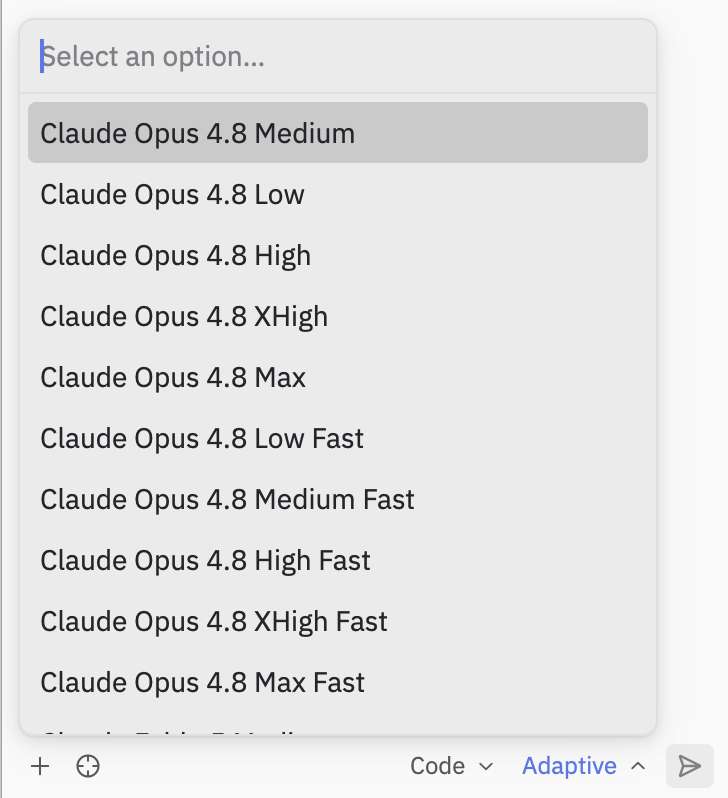
    <Frame title="Zed 中的 Devin">
      <img src="https://mintcdn.com/cognitionai/uo-c3zobSYhZC--y/images/cli/acp/zed-models.png?fit=max&auto=format&n=uo-c3zobSYhZC--y&q=85&s=642c87e40bec22c2c736e917e1d38866" alt="Zed 中的 Devin" width="728" height="798" data-path="images/cli/acp/zed-models.png" />
    </Frame>
  </Step>
</Steps>

<div id="notes-and-limitations">
  ## 注意事项和限制
</div>

* Devin CLI 的终端/Shell 输出是通过 Zed 的 ACP 渲染呈现的，
  因此与原生的 Devin CLI 终端 UI 不同。某些更丰富的交互
  仅在独立 CLI 中可用。
* `devin acp` 子命令设计为由支持 ACP 的客户端
  (如 Zed) 作为子进程启动——它通过 stdio 使用 JSON-RPC 通信，
  并不适合以交互方式运行。请参阅
  命令参考中的
  [`devin acp`](/zh/cli/reference/commands#devin-acp)。
