> ## Documentation Index
> Fetch the complete documentation index at: https://docs.devin.ai/llms.txt
> Use this file to discover all available pages before exploring further.
# Visual Studio Troubleshooting
> Troubleshoot Visual Studio plugin issues including IntelliCode conflicts, Tab key bindings, and marketplace visibility problems.
We strongly recommend using the native Devin Desktop Editor or the JetBrains local plugin for their advanced agentic AI capabilities and cutting-edge features.
The Visual Studio plugin is under maintenance mode.
# Supported Versions
Visual Studio 17.5.5 or greater.
# Gathering extension logs
Go to `View > Output`, select `Codeium` in the dropdown, and copy the logs.
# Known IDE issues and solutions
## Don't see Codeium in the VS Marketplace
Make sure that you are using VS version 2022 17.5.5 or greater.
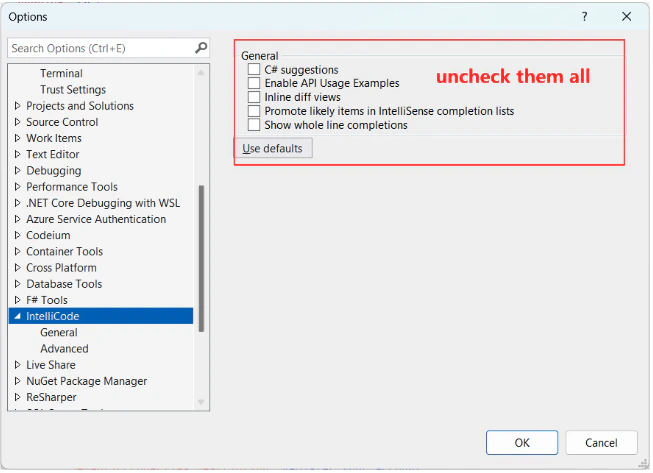
## Seeing overlapping autocomplete suggestions
This happens if Visual Studio's IntelliCode suggestions are displayed at the same time as Codeium's. Disable all IntelliCode options as shown below:
 ## Tab key is not always accepting completions
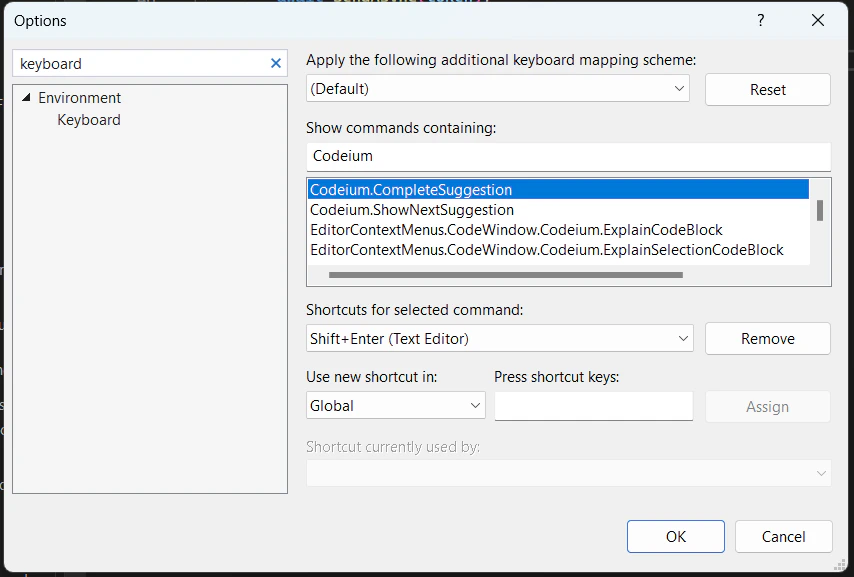
You can rebind this to a different keyboard shortcut in your settings:
## Tab key is not always accepting completions
You can rebind this to a different keyboard shortcut in your settings: